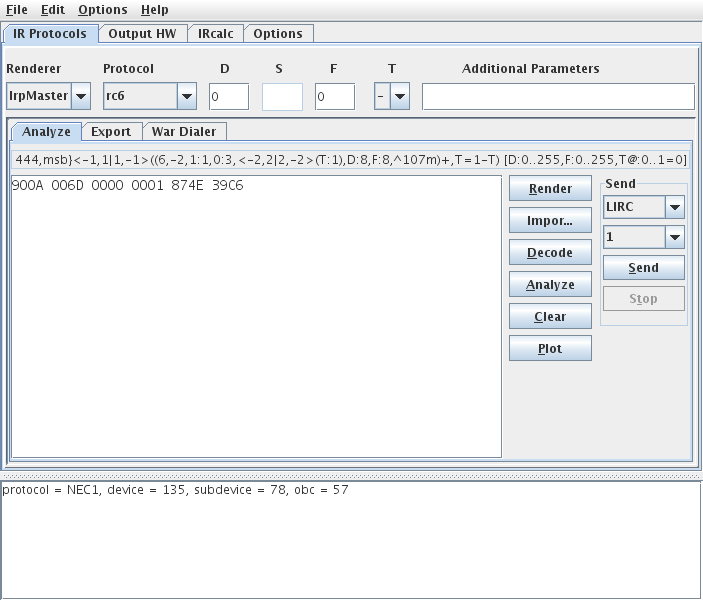
Power Off: 900A 006D 0000 0001 874E 39C6
So someone gave me Pronto hex code which appears to be for a builtin protocol. I wanted to convert this to something I could use in KM. I'm probably not the best at using phpBB search, but it was surprisingly difficult for me to find an answer.
Apparently IRTool handles the longer Pronto hex for learned codes and will decode and give you the stuff needed for JP1. However for the shorter-style Pronto "builtin" IR code, I don't think IRTool handles decoding (or I'm not using it properly because it tells me this is wrong format)
After some searching I found the following thread:
https://www.hifi-remote.com/forums/viewtopic.php?t=3258
Which basically tells 900A is NEC1 protocol, 87 is hex for device #, and 39 is hex for OBC.
This thread is back from 2004. I'm wondering is there now a tool I can use to decode the Pronto hex (I think Rob referred to them as udb?) or do I just have to do it manually?
If the latter, is it the same formula for all protocols or is there some written stuff I can read?
Convert Pronto hex to JP1?
Moderator: Moderators
Re: Tool to convert Pronto "builtin" hex to JP1?
It doesn't.sfhub wrote: However for the shorter-style Pronto "builtin" IR code, I don't think IRTool handles decoding
Correctsfhub wrote:Which basically tells 900A is NEC1 protocol, 87 is hex for device #, and 39 is hex for OBC.
That wasn't a UDB code. UDB is a different short form. IrTool doesn't handle any of the short forms.sfhub wrote:I'm wondering is there now a tool I can use to decode the Pronto hex (I think Rob referred to them as udb?) or do I just have to do it manually?
I don't know any tool that handles them from textual Pronto Hex.
If the codes are in a CCF file, then DecodeCCF understands almost all the short forms, including the 900A.
Most protocols have no short form, so you would find only the long form and IrTool will decode most of them.sfhub wrote:If the latter, is it the same formula for all protocols or is there some written stuff I can read?
For those that have short forms, each has different rules and the descriptions are scattered across many threads at RemoteCentral. The only place I know where those descriptions are gathered together is a document by Eigeny Olianov (hope I spelled that right) often referenced at RC. But that document is way too hard for a beginner to understand (sometimes too hard for me to understand). The content is moderately hard to begin with and Eigeny's English isn't that good and he tends to assume the reader knows more background than anyone would.
-
The Robman
- Site Owner
- Posts: 22056
- Joined: Fri Aug 01, 2003 9:37 am
- Location: Chicago, IL
- Contact:
The trouble is that while there are a few of us that know the standard Pronto format inside and out, knowledge of the off-beat formats is somewhat limited. There aren't any tools (that I know of) that translate the non-raw formats for you.
To address your particular signal, here's the decode...
87 = device code 135
4E = sub-device code 78
39 = OBC 57
C6 = complement of OBC
So, to re-create this button in KM you would select the NEC1 protocol, enter 135 as the device code, enter 78 as the sub-device code and then enter 57 as the OBC for the function in question.
Now for some general pronto info...
When a string of Pronto hex begins with "0000" it means that it's raw data, which means that everything that you need to know about the signal is included in the data but when the first word is something else, it means that the Pronto is using some internal data to format the signal.
Here's a quick list from the PDF file that was referenced in that old thread:
0000 - raw oscillated code
0100 - raw unmodulated code
5000 - Philips RC5
5001 - Philips RC5x
6000 - Philips RC6 Mode 0
7000 - predefined code of variable length
8000 - index to UDB
900x - various versions of the NEC protocol.
The easy 900x forms are:
900A = NEC1
900B = NEC2
The "UDB" (Universal Data Base) is the UEI database, so the data in a string beginning with "8000" will translate into UEI setup codes, etc but I don't know the exact format. Rather than encoding the OBC into the signal, they encode a reference to a code in the ROM, so we don't know what it is, but we can derive the setup code (eg, TV/0156) from the hex which means we can look up what the protocol and device code(s) are.
This thread talks about the UDB stuff a bit more...
https://www.hifi-remote.com/forums/viewtopic.php?t=5345
To address your particular signal, here's the decode...
87 = device code 135
4E = sub-device code 78
39 = OBC 57
C6 = complement of OBC
So, to re-create this button in KM you would select the NEC1 protocol, enter 135 as the device code, enter 78 as the sub-device code and then enter 57 as the OBC for the function in question.
Now for some general pronto info...
When a string of Pronto hex begins with "0000" it means that it's raw data, which means that everything that you need to know about the signal is included in the data but when the first word is something else, it means that the Pronto is using some internal data to format the signal.
Here's a quick list from the PDF file that was referenced in that old thread:
0000 - raw oscillated code
0100 - raw unmodulated code
5000 - Philips RC5
5001 - Philips RC5x
6000 - Philips RC6 Mode 0
7000 - predefined code of variable length
8000 - index to UDB
900x - various versions of the NEC protocol.
The easy 900x forms are:
900A = NEC1
900B = NEC2
The "UDB" (Universal Data Base) is the UEI database, so the data in a string beginning with "8000" will translate into UEI setup codes, etc but I don't know the exact format. Rather than encoding the OBC into the signal, they encode a reference to a code in the ROM, so we don't know what it is, but we can derive the setup code (eg, TV/0156) from the hex which means we can look up what the protocol and device code(s) are.
This thread talks about the UDB stuff a bit more...
https://www.hifi-remote.com/forums/viewtopic.php?t=5345
Last edited by The Robman on Wed Apr 22, 2009 8:11 am, edited 2 times in total.
Rob
www.hifi-remote.com
Please don't PM me with remote questions, post them in the forums so all the experts can help!
www.hifi-remote.com
Please don't PM me with remote questions, post them in the forums so all the experts can help!
Re: Tool to convert Pronto "builtin" hex to JP1?
Great, so I think you are saying there is a roundabout way to get the textual Pronto "short form" hex decoded. First take the textual hex and create a Pronto CCF, then let DecodeCCF do the work?johnsfine wrote:I don't know any tool that handles them from textual Pronto Hex.
If the codes are in a CCF file, then DecodeCCF understands almost all the short forms, including the 900A.
Given how few short forms there are from the posts above, it would probably be easier if I just memorized how to do the conversions, but I'm just curious, what is a good tool to use to create a CCF from the textual Pronto short form hex?
I tried using Pronto NG, but it doesn't seem to have an export CCF function.
-
vickyg2003
- Site Admin
- Posts: 7109
- Joined: Sat Mar 20, 2004 12:19 pm
- Location: Florida
- Contact:
Here is a link for some more information on Pronto Hex.
https://www.hifi-remote.com/forums/dload ... le_id=6906
https://www.hifi-remote.com/forums/dload ... le_id=6906
-
The Robman
- Site Owner
- Posts: 22056
- Joined: Fri Aug 01, 2003 9:37 am
- Location: Chicago, IL
- Contact:
Here's some more info on how to decode the 8000 format.
Here are some samples from here
8000 0000 0002 0000 000d 0038 0002 0000 - On
8000 0000 0002 0000 000d 0038 0001 0000 - Off
The 5th word (reading left to right) gives you the device type.
The 6th word gives you the setup code.
The 7th word gives you the button number.
The device types are as follows (from the DecodeCCF.cpp source):
1 "A. Proc",
2 "Cable",
3 "CD",
4 "CDR",
5 "DBS",
6 "DVD",
7 "FlatTV",
8 "Home",
9 "LD",
a "PreAmp",
b "Tape",
c "Tuner",
d "TV",
e "VCR",
f "WebTV"
So, as the 5th word is "000d" this is a TV setup code. The 6th word is "0038" which converts to decimal 0056, so this is TV/0056. The devices.xls spreadsheet can be used to get the protocol info for TV/0056, which is NEC1, device 4.
I ran the following CCF file through DecodeCCF. The results make me think that the following table tells us what each button actually is:
01 - Power Off
02 - Power On
03 - Channel Down
04 - Channel Up
05 - Mute
06 - Volume Down
07 - Volume Up
08 - Digit 0
09 - Digit 1
10 - Digit 2
11 - Digit 3
12 - Digit 4
13 - Digit 5
14 - Digit 6
15 - Digit 7
16 - Digit 8
17 - Digit 9
Here are some samples from here
8000 0000 0002 0000 000d 0038 0002 0000 - On
8000 0000 0002 0000 000d 0038 0001 0000 - Off
The 5th word (reading left to right) gives you the device type.
The 6th word gives you the setup code.
The 7th word gives you the button number.
The device types are as follows (from the DecodeCCF.cpp source):
1 "A. Proc",
2 "Cable",
3 "CD",
4 "CDR",
5 "DBS",
6 "DVD",
7 "FlatTV",
8 "Home",
9 "LD",
a "PreAmp",
b "Tape",
c "Tuner",
d "TV",
e "VCR",
f "WebTV"
So, as the 5th word is "000d" this is a TV setup code. The 6th word is "0038" which converts to decimal 0056, so this is TV/0056. The devices.xls spreadsheet can be used to get the protocol info for TV/0056, which is NEC1, device 4.
I ran the following CCF file through DecodeCCF. The results make me think that the following table tells us what each button actually is:
01 - Power Off
02 - Power On
03 - Channel Down
04 - Channel Up
05 - Mute
06 - Volume Down
07 - Volume Up
08 - Digit 0
09 - Digit 1
10 - Digit 2
11 - Digit 3
12 - Digit 4
13 - Digit 5
14 - Digit 6
15 - Digit 7
16 - Digit 8
17 - Digit 9
Rob
www.hifi-remote.com
Please don't PM me with remote questions, post them in the forums so all the experts can help!
www.hifi-remote.com
Please don't PM me with remote questions, post them in the forums so all the experts can help!
Yes, devices.xls can be used to get the protocol information, but I find Vicky's Lookup Tool to be easier to use plus it gives the EFCs provided by that setup code. Link at the top of this page.
Does this 8000 format originate with Philips? If so, why does it provide a reference to a UEI setup code?
Does this 8000 format originate with Philips? If so, why does it provide a reference to a UEI setup code?
-
Kevin Timmerman
- Expert
- Posts: 142
- Joined: Tue Jan 09, 2007 5:52 pm
- Location: West Michigan
This is just a note to say that the new IR 8.03, announced here, will import Pronto hex as learned signals. It handles both raw and predefined formats, other than format 8000. The forthcoming IRScope 2.01, now in final stages of beta testing, will also import Pronto hex. The two programs share a common dll, ExchangeIR.dll, that actually handles the import.
________________
Graham
________________
Graham
-
vickyg2003
- Site Admin
- Posts: 7109
- Joined: Sat Mar 20, 2004 12:19 pm
- Location: Florida
- Contact:
Cool Graham. We've needed a tool to do this for a long time.
Remember to provide feedback to let us know how the problem was solved and share your upgrades.
Tip: When creating an upgrade, always include ALL functions from the oem remote, even if you never plan on assigning them to a button. Complete function lists makes an upgrade more helpful to others.
Tip: When creating an upgrade, always include ALL functions from the oem remote, even if you never plan on assigning them to a button. Complete function lists makes an upgrade more helpful to others.
Just reading through this old thread, I thought that I might add that the current release of IrMaster decodes short format Pronto codes of type 5000, 5001, 6000, and 900a. I think that implementing the others is not very interesting, if someone disagree, then speak out.