I have a UEI remote model 1056B01. I am trying to capture the volume down ir command for my Denon Receiver AVR-3803, but can not do it.
1. I am using setup code 1360 on the "AUD" button. I was told this was the correct setup code, and I believe it is because the receiver reacts to some of the commands I send to it
2. Then I enter the advanced code for volume-(volume down) which I was told is 01995. The process I use to enter the advanced code is...
press device "AUD"
press setup until 2 blinks
press 994
press setup and do NOT hold it
press 01995
press hard button volume down and I do get 2 blinks of the "AUD" device button
It does not work. Is there a master reset for the remote I could perform to unblock a problem? Maybe it has to do with a punch volume punch through? Any help would be greatly appreciated.
Thank You;
Steven Kovacs
Understanding Advanced Codes
Moderator: Moderators
You shouldn't have to any of that. Vol for Denon should be built in.
Do the 4 steps below using the AUD device button:
http://www.hifi-remote.com/wiki/index.p ... ch_Through
If you want to try your other procedure, I think the correct codes are actually these for setup code AUD 1360:
Volume + 67509
Volume - 67445
Mute 67381
Here's how to do a full reset:
http://www.hifi-remote.com/wiki/index.p ... y_Defaults
Do the 4 steps below using the AUD device button:
http://www.hifi-remote.com/wiki/index.p ... ch_Through
If you want to try your other procedure, I think the correct codes are actually these for setup code AUD 1360:
Volume + 67509
Volume - 67445
Mute 67381
Here's how to do a full reset:
http://www.hifi-remote.com/wiki/index.p ... y_Defaults
-
Steven Kovacs
- Posts: 71
- Joined: Thu Aug 06, 2015 10:10 pm
Understanding Advanced Codes
When I do a file search for advanced codes for any device I can not understnad the information that comes up on the screen. As I understand, all I need to know is the 4 digit setup code for the particular device I have in mind, and the 5 digit advanced code for the command I want. But I'll be dam if i can tell what the setup code is, or what the advanced codes are when the information comes up on my computer. I am using a UEI remote model 1056B01. Here is part of the information that comes up when I search my Denon AVR-3803 receiver...
Name:,Denon AVR-3803 Receiver,,,,v7.53,,,,,,,CURRENT DATA
Devices:,Denon Combo (Official),,,,,,,,,,,
Manual:,,0 = 1-byte,LSB-COMP,58,NO,,,,,,,
Setup:,1383,27 = URC-9910 / 8910,05 - Tuner,EFC,USE,,,,,,,
URC-9910 / 8910 Device Upgrade/Key Move Code:,,,,,,,,,,,,
Upgrade Code 0 = A5 67 (Tuner/1383),,,,,,,,,,,,
9C 00 FE FE FF B8 EC B8 3C B8 DC B8 5C B8 38 B8 AC B8 CC B8 4C B8 8C B8 84 B8 70 B8 B0 B8 F0 C8 94 C8 54 B8 7C C8 FA C8 3A C8 DA C8 01 B8 44 B8 F8 B8 B4 B8 6C C8 14 C8 EA C8 9E B8 58 B8 C8 C8 86 C8 3E C8 46 B8 A9,,,,,,,,,,,,
KeyMoves,,,,,,,,,,,,
14 F4 A5 67 C8 7A 30 F4 A5 67 B8 A8 3A F4 A5 67 C8 92 13 F4 A5 67 B8 04 3C F4 A5 67 D8 12 3B F4 A5 67 B8 C4 37 F4 A5 67 C8 BE 25 F4 A5 67 B8 D8 26 F4 A5 67 D8 56 27 F4 A5 67 D8 96 28 F4 A5 67 B8 98,,,,,,,,,,,,
End,,,,,,,,,,,,
Protocol Code:,,,,,,,,,,,,
Upgrade Protocol 0 = 00 9C (S3C8+),,,,,,,,,,,,
3D 92 02 8B 0D 49 05 08 00 84 01 75 00 84 03 87 83 C2 E6 24 03 20 10 0C 05 E4 03 05 60 05 90 05 0A FC B0 C6 A6 0D 02 EB 03 E6 0D 05 F6 01 46 60 04 60 05 F6 01 0A 7B 02 60 C6 F6 01 46 37 61 09 60 04 60 05 F6 01 0A 7B E3 AF,,,,,,,,,,,,
End,,,,,,,,,,,,
Key Move Code:,,,198,,,,,,,,,
vol up,145,2,vol up,10 - vol up,VOLUME UP,,,,,,,
vol down,143,2,vol down,11 - vol down,VOLUME DOWN,,,,,,,
mute,141,2,mute,12 - mute,MUTE,,,,,,,
channel up,110,12,channel up,13 - channel up,TUNE PRESETS UP,,,,,,,
channel down,112,12,channel down,14 - channel down,TUNE PRESETS DOWN,,,,,,,
power,177,2,power,15 - power,POWER,,,,,,,
enter,111,2,enter,16 - enter,CDR/TAPE,,,,,,,
tv/vcr,049,2,tv/vid,17 - tv/vcr,TV,,,,,,,
My questions are...
1. In all this info what is the four digit setup code for my UEI model 1056BO1 remote?
2. What is the 5 digit advanced code for volume+?
3. What does "Key Move Code:,,,198,,,,,,,,," mean?
There are no particular codes I am looking for at this time. There will be in the future. I am simply trying to understand how to decipher all this information.
Thanks for the help.
Steven Kovacs
Name:,Denon AVR-3803 Receiver,,,,v7.53,,,,,,,CURRENT DATA
Devices:,Denon Combo (Official),,,,,,,,,,,
Manual:,,0 = 1-byte,LSB-COMP,58,NO,,,,,,,
Setup:,1383,27 = URC-9910 / 8910,05 - Tuner,EFC,USE,,,,,,,
URC-9910 / 8910 Device Upgrade/Key Move Code:,,,,,,,,,,,,
Upgrade Code 0 = A5 67 (Tuner/1383),,,,,,,,,,,,
9C 00 FE FE FF B8 EC B8 3C B8 DC B8 5C B8 38 B8 AC B8 CC B8 4C B8 8C B8 84 B8 70 B8 B0 B8 F0 C8 94 C8 54 B8 7C C8 FA C8 3A C8 DA C8 01 B8 44 B8 F8 B8 B4 B8 6C C8 14 C8 EA C8 9E B8 58 B8 C8 C8 86 C8 3E C8 46 B8 A9,,,,,,,,,,,,
KeyMoves,,,,,,,,,,,,
14 F4 A5 67 C8 7A 30 F4 A5 67 B8 A8 3A F4 A5 67 C8 92 13 F4 A5 67 B8 04 3C F4 A5 67 D8 12 3B F4 A5 67 B8 C4 37 F4 A5 67 C8 BE 25 F4 A5 67 B8 D8 26 F4 A5 67 D8 56 27 F4 A5 67 D8 96 28 F4 A5 67 B8 98,,,,,,,,,,,,
End,,,,,,,,,,,,
Protocol Code:,,,,,,,,,,,,
Upgrade Protocol 0 = 00 9C (S3C8+),,,,,,,,,,,,
3D 92 02 8B 0D 49 05 08 00 84 01 75 00 84 03 87 83 C2 E6 24 03 20 10 0C 05 E4 03 05 60 05 90 05 0A FC B0 C6 A6 0D 02 EB 03 E6 0D 05 F6 01 46 60 04 60 05 F6 01 0A 7B 02 60 C6 F6 01 46 37 61 09 60 04 60 05 F6 01 0A 7B E3 AF,,,,,,,,,,,,
End,,,,,,,,,,,,
Key Move Code:,,,198,,,,,,,,,
vol up,145,2,vol up,10 - vol up,VOLUME UP,,,,,,,
vol down,143,2,vol down,11 - vol down,VOLUME DOWN,,,,,,,
mute,141,2,mute,12 - mute,MUTE,,,,,,,
channel up,110,12,channel up,13 - channel up,TUNE PRESETS UP,,,,,,,
channel down,112,12,channel down,14 - channel down,TUNE PRESETS DOWN,,,,,,,
power,177,2,power,15 - power,POWER,,,,,,,
enter,111,2,enter,16 - enter,CDR/TAPE,,,,,,,
tv/vcr,049,2,tv/vid,17 - tv/vcr,TV,,,,,,,
My questions are...
1. In all this info what is the four digit setup code for my UEI model 1056BO1 remote?
2. What is the 5 digit advanced code for volume+?
3. What does "Key Move Code:,,,198,,,,,,,,," mean?
There are no particular codes I am looking for at this time. There will be in the future. I am simply trying to understand how to decipher all this information.
Thanks for the help.
Steven Kovacs
-
Steven Kovacs
- Posts: 71
- Joined: Thu Aug 06, 2015 10:10 pm
Undersgtanding Advanced Codes
When I do a file search for advanced codes for any device I can not understnad the information that comes up on the screen. As I understand, all I need to know is the 4 digit setup code for the particular device I have in mind, and the 5 digit advanced code for the command I want. But I'll be dam if i can tell what the setup code is, or what the advanced codes are when the information comes up on my computer. I am using a UEI remote model 1056B01. Here is part of the information that comes up when I search my Denon AVR-3803 receiver...
Name:,Denon AVR-3803 Receiver,,,,v7.53,,,,,,,CURRENT DATA
Devices:,Denon Combo (Official),,,,,,,,,,,
Manual:,,0 = 1-byte,LSB-COMP,58,NO,,,,,,,
Setup:,1383,27 = URC-9910 / 8910,05 - Tuner,EFC,USE,,,,,,,
URC-9910 / 8910 Device Upgrade/Key Move Code:,,,,,,,,,,,,
Upgrade Code 0 = A5 67 (Tuner/1383),,,,,,,,,,,,
9C 00 FE FE FF B8 EC B8 3C B8 DC B8 5C B8 38 B8 AC B8 CC B8 4C B8 8C B8 84 B8 70 B8 B0 B8 F0 C8 94 C8 54 B8 7C C8 FA C8 3A C8 DA C8 01 B8 44 B8 F8 B8 B4 B8 6C C8 14 C8 EA C8 9E B8 58 B8 C8 C8 86 C8 3E C8 46 B8 A9,,,,,,,,,,,,
KeyMoves,,,,,,,,,,,,
14 F4 A5 67 C8 7A 30 F4 A5 67 B8 A8 3A F4 A5 67 C8 92 13 F4 A5 67 B8 04 3C F4 A5 67 D8 12 3B F4 A5 67 B8 C4 37 F4 A5 67 C8 BE 25 F4 A5 67 B8 D8 26 F4 A5 67 D8 56 27 F4 A5 67 D8 96 28 F4 A5 67 B8 98,,,,,,,,,,,,
End,,,,,,,,,,,,
Protocol Code:,,,,,,,,,,,,
Upgrade Protocol 0 = 00 9C (S3C8+),,,,,,,,,,,,
3D 92 02 8B 0D 49 05 08 00 84 01 75 00 84 03 87 83 C2 E6 24 03 20 10 0C 05 E4 03 05 60 05 90 05 0A FC B0 C6 A6 0D 02 EB 03 E6 0D 05 F6 01 46 60 04 60 05 F6 01 0A 7B 02 60 C6 F6 01 46 37 61 09 60 04 60 05 F6 01 0A 7B E3 AF,,,,,,,,,,,,
End,,,,,,,,,,,,
Key Move Code:,,,198,,,,,,,,,
vol up,145,2,vol up,10 - vol up,VOLUME UP,,,,,,,
vol down,143,2,vol down,11 - vol down,VOLUME DOWN,,,,,,,
mute,141,2,mute,12 - mute,MUTE,,,,,,,
channel up,110,12,channel up,13 - channel up,TUNE PRESETS UP,,,,,,,
channel down,112,12,channel down,14 - channel down,TUNE PRESETS DOWN,,,,,,,
power,177,2,power,15 - power,POWER,,,,,,,
enter,111,2,enter,16 - enter,CDR/TAPE,,,,,,,
tv/vcr,049,2,tv/vid,17 - tv/vcr,TV,,,,,,,
My questions are...
1. In all this info what is the four digit setup code for my UEI model 1056BO1 remote?
2. What is the 5 digit advanced code for volume+?
3. What does "Key Move Code:,,,198,,,,,,,,," mean?
There are no particular codes I am looking for at this time. There will be in the future. I am simply trying to understand how to decipher all this information.
Thanks for the help.
Steven Kovacs
Name:,Denon AVR-3803 Receiver,,,,v7.53,,,,,,,CURRENT DATA
Devices:,Denon Combo (Official),,,,,,,,,,,
Manual:,,0 = 1-byte,LSB-COMP,58,NO,,,,,,,
Setup:,1383,27 = URC-9910 / 8910,05 - Tuner,EFC,USE,,,,,,,
URC-9910 / 8910 Device Upgrade/Key Move Code:,,,,,,,,,,,,
Upgrade Code 0 = A5 67 (Tuner/1383),,,,,,,,,,,,
9C 00 FE FE FF B8 EC B8 3C B8 DC B8 5C B8 38 B8 AC B8 CC B8 4C B8 8C B8 84 B8 70 B8 B0 B8 F0 C8 94 C8 54 B8 7C C8 FA C8 3A C8 DA C8 01 B8 44 B8 F8 B8 B4 B8 6C C8 14 C8 EA C8 9E B8 58 B8 C8 C8 86 C8 3E C8 46 B8 A9,,,,,,,,,,,,
KeyMoves,,,,,,,,,,,,
14 F4 A5 67 C8 7A 30 F4 A5 67 B8 A8 3A F4 A5 67 C8 92 13 F4 A5 67 B8 04 3C F4 A5 67 D8 12 3B F4 A5 67 B8 C4 37 F4 A5 67 C8 BE 25 F4 A5 67 B8 D8 26 F4 A5 67 D8 56 27 F4 A5 67 D8 96 28 F4 A5 67 B8 98,,,,,,,,,,,,
End,,,,,,,,,,,,
Protocol Code:,,,,,,,,,,,,
Upgrade Protocol 0 = 00 9C (S3C8+),,,,,,,,,,,,
3D 92 02 8B 0D 49 05 08 00 84 01 75 00 84 03 87 83 C2 E6 24 03 20 10 0C 05 E4 03 05 60 05 90 05 0A FC B0 C6 A6 0D 02 EB 03 E6 0D 05 F6 01 46 60 04 60 05 F6 01 0A 7B 02 60 C6 F6 01 46 37 61 09 60 04 60 05 F6 01 0A 7B E3 AF,,,,,,,,,,,,
End,,,,,,,,,,,,
Key Move Code:,,,198,,,,,,,,,
vol up,145,2,vol up,10 - vol up,VOLUME UP,,,,,,,
vol down,143,2,vol down,11 - vol down,VOLUME DOWN,,,,,,,
mute,141,2,mute,12 - mute,MUTE,,,,,,,
channel up,110,12,channel up,13 - channel up,TUNE PRESETS UP,,,,,,,
channel down,112,12,channel down,14 - channel down,TUNE PRESETS DOWN,,,,,,,
power,177,2,power,15 - power,POWER,,,,,,,
enter,111,2,enter,16 - enter,CDR/TAPE,,,,,,,
tv/vcr,049,2,tv/vid,17 - tv/vcr,TV,,,,,,,
My questions are...
1. In all this info what is the four digit setup code for my UEI model 1056BO1 remote?
2. What is the 5 digit advanced code for volume+?
3. What does "Key Move Code:,,,198,,,,,,,,," mean?
There are no particular codes I am looking for at this time. There will be in the future. I am simply trying to understand how to decipher all this information.
Thanks for the help.
Steven Kovacs
You must open those files in Remote Master to see the advanced codes (EFC on the Functions tab). Viewing in Notepad results in mostly nonsense. Keymoves can be ignored.
The files do not contain any meaningful setup code. As I said earlier, you note the protocol, device and subdevice. Enter than info in the Lookup Tool, and that will return a list of compatible setup codes.
The files do not contain any meaningful setup code. As I said earlier, you note the protocol, device and subdevice. Enter than info in the Lookup Tool, and that will return a list of compatible setup codes.
-
Steven Kovacs
- Posts: 71
- Joined: Thu Aug 06, 2015 10:10 pm
They're clearly labeled on the main window in Remote Master:
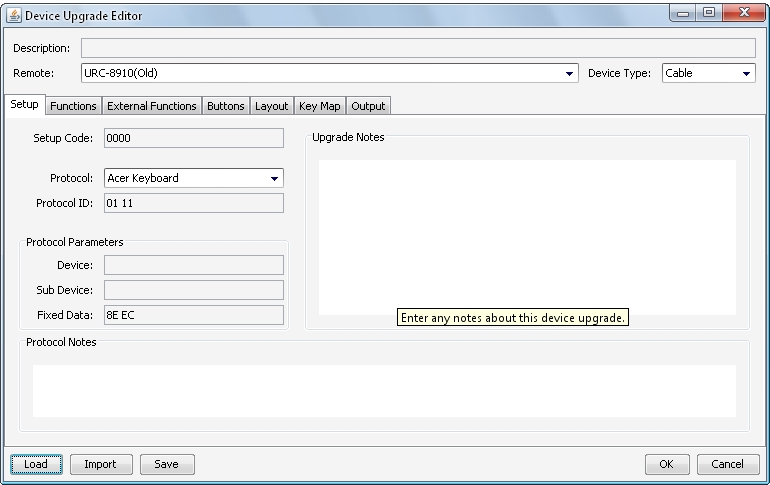
In your example, the protocol is "Denon Combo (official)" and the device and subdevice are just numbers (which I cannot discern from your post).
On the LookUp Tool page, click search by "Protocol", pick the matching protocol from the drop-down box and type the device and subdevice numbers in Dev1 and Dev2 boxes respectively.
I'm glad that you want to understand how to do this yourself. But if it's too complicated, just continue posting code searches (using the template please) and we can find the information for you. An expert can find the information in about 30 seconds.
In your example, the protocol is "Denon Combo (official)" and the device and subdevice are just numbers (which I cannot discern from your post).
On the LookUp Tool page, click search by "Protocol", pick the matching protocol from the drop-down box and type the device and subdevice numbers in Dev1 and Dev2 boxes respectively.
I'm glad that you want to understand how to do this yourself. But if it's too complicated, just continue posting code searches (using the template please) and we can find the information for you. An expert can find the information in about 30 seconds.
-
vickyg2003
- Site Admin
- Posts: 7109
- Joined: Sat Mar 20, 2004 12:19 pm
- Location: Florida
- Contact:
Steve I didn't notice before but you have been using the term Adnanced
Codes, that is an old term that has been replaced with EFC.
EFC == Advanced code.
What is a protocol
A protocol is the set of rules a signal must follow in order to be recognized by your equipment. When we know what the protocol is we can find a way to send it from your remote. We can use a built in protocol executor or write a new one. An executor is a subroutine that takes a few variables and produces the required signal. There is the fixed data that is used to create the part of the signal that is the same for every fuction. Their is also a variable part of the signal.
That EFC is a UEI code that can be translated into the part of the variable part of the signal that triggers the specific function
Codes, that is an old term that has been replaced with EFC.
EFC == Advanced code.
What is a protocol
A protocol is the set of rules a signal must follow in order to be recognized by your equipment. When we know what the protocol is we can find a way to send it from your remote. We can use a built in protocol executor or write a new one. An executor is a subroutine that takes a few variables and produces the required signal. There is the fixed data that is used to create the part of the signal that is the same for every fuction. Their is also a variable part of the signal.
That EFC is a UEI code that can be translated into the part of the variable part of the signal that triggers the specific function
Remember to provide feedback to let us know how the problem was solved and share your upgrades.
Tip: When creating an upgrade, always include ALL functions from the oem remote, even if you never plan on assigning them to a button. Complete function lists makes an upgrade more helpful to others.
Tip: When creating an upgrade, always include ALL functions from the oem remote, even if you never plan on assigning them to a button. Complete function lists makes an upgrade more helpful to others.