I'm sorry. In an earlier post I wrote that the RMDU file worked with either 2.02a or 2.03 Alpha 21. In fact I was loading an older "fireplace file". Comparing my rmaster.err file with osterac's showed my error.
Using the correct file, I find that 2.03 Alpha 21 does load the rmdu file, while 2.02a doesn't work, yielding a red setup code. I checked the upload using 2.03 Alpha 21 with an IR Widget, and it seems to shoot the correct protocol.
RCRP05B and remote for fireplace
Moderator: Moderators
I tried downloading the 2.03 version you linked to, but I don't think it's compatible with my remote. The only interface option is CommHid and it doesn't detect my remote (I use a USB JP1.2/1.3 adapter). I'm not sure if it matters, but whenever I run setup.vbs for RMIR it always creates shortcuts to the 64-bit version of Java. If I run it like that, there are no interface options and no option to download from remote. I have to edit the shortcut to point to the 32-bit version like this:
"C:\Program Files (x86)\Java\jre7\bin\javaw.exe" -jar RemoteMaster.jar
And then it works.
"C:\Program Files (x86)\Java\jre7\bin\javaw.exe" -jar RemoteMaster.jar
And then it works.
-
vickyg2003
- Site Admin
- Posts: 7109
- Joined: Sat Mar 20, 2004 12:19 pm
- Location: Florida
- Contact:
I've been trying to get back to this thread, but every time I come into the forum those spamming pests have been busy and demand my attention.
Do I need to recreate the rdmu, or is the fireplace upgrade working?
Do I need to recreate the rdmu, or is the fireplace upgrade working?
Remember to provide feedback to let us know how the problem was solved and share your upgrades.
Tip: When creating an upgrade, always include ALL functions from the oem remote, even if you never plan on assigning them to a button. Complete function lists makes an upgrade more helpful to others.
Tip: When creating an upgrade, always include ALL functions from the oem remote, even if you never plan on assigning them to a button. Complete function lists makes an upgrade more helpful to others.
Hello again,
If you think re-creating the rdmu would help, then by all means. When I upload it to the remote, it appears as if everything is fine, but it doesn't work. If I then plug the remote back in and click the download button, the fireplace device disappears. Here's the error log I linked to on the previous page, this is after I had changed the PID to a higher value (didn't help) and the device type to DVD (so the 1234 code would work).
https://www.hifi-remote.com/forums/dload ... e_id=12463
Thanks
If you think re-creating the rdmu would help, then by all means. When I upload it to the remote, it appears as if everything is fine, but it doesn't work. If I then plug the remote back in and click the download button, the fireplace device disappears. Here's the error log I linked to on the previous page, this is after I had changed the PID to a higher value (didn't help) and the device type to DVD (so the 1234 code would work).
https://www.hifi-remote.com/forums/dload ... e_id=12463
Thanks
Try installing 2.03 per these instructions (ignore the EZ-RC and Xsight parts). Make sure you run the included bat file (or is it vbs?) to get shortcuts. Then it should work with your interface. 2.03 won't work correctly unless you install it on top of 2.02.
https://www.hifi-remote.com/forums/viewtopic.php?t=14804
https://www.hifi-remote.com/forums/viewtopic.php?t=14804
So for RMIR 2.03, here's what I did:
extracted RMIR 2.02 to a new folder
copied RemoteMaster.jar and protocols.ini from RMIR203Alpha21e.zip to the RMIR 2.02 folder, overwriting old files.
ran setup.vbs
ran RMIR, pointed it to maps and RDFs.
Tried to sync with remote, no remotes found and only one interface type available (2.03 on left):
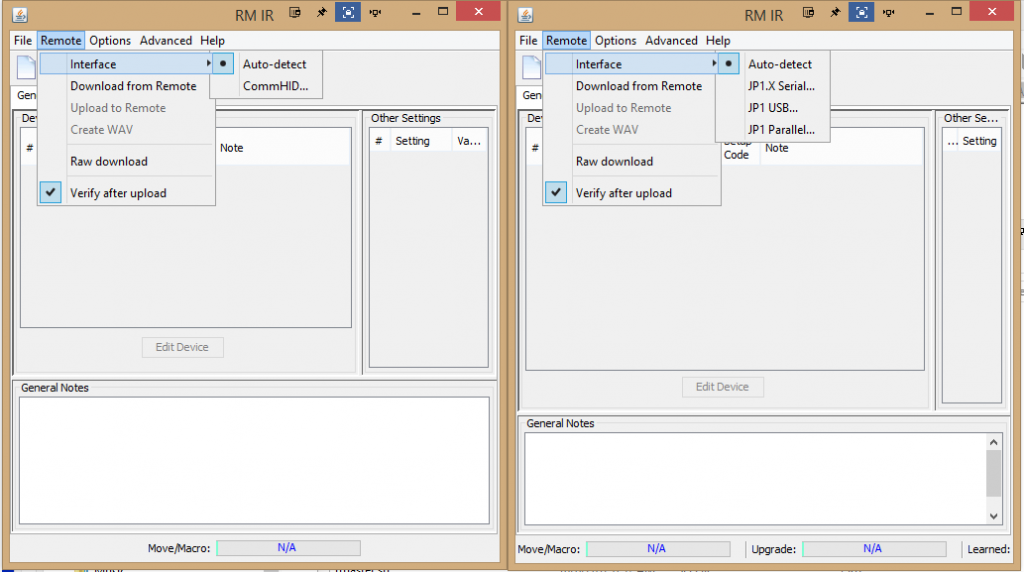
Tried starting RMIR with 32 and 64 bit versions of Java.
extracted RMIR 2.02 to a new folder
copied RemoteMaster.jar and protocols.ini from RMIR203Alpha21e.zip to the RMIR 2.02 folder, overwriting old files.
ran setup.vbs
ran RMIR, pointed it to maps and RDFs.
Tried to sync with remote, no remotes found and only one interface type available (2.03 on left):

Tried starting RMIR with 32 and 64 bit versions of Java.
Compare your rmaster.err files. They tell you where RMIR is looking for JP12Serial.dll. Here's from 2.03Alpha 21 on my computer. If you're loading a 64 bit version, RMIR won't attmept to load jp1USB or jp1parallel.
Code: Select all
ibraryFolder=C:\Remotes\2.03 Alpha\Windows-x86
LibraryLoader: Java version '1.7.0_51' from 'C:\Program Files\Java\jre7' running on 'Windows XP' (x86)
LibraryLoader: Attempting to load 'jp12serial' from 'C:\Remotes\2.03 Alpha\Windows-x86\jp12serial.dll'...
LibraryLoader: Loaded 'jp12serial' successfully from 'C:\Remotes\2.03 Alpha\Windows-x86\jp12serial.dll'
    JP12Serial version 0.19
    CommHID version 0.2
LibraryLoader: Java version '1.7.0_51' from 'C:\Program Files\Java\jre7' running on 'Windows XP' (x86)
LibraryLoader: Attempting to load 'jp1usb' from 'C:\Remotes\2.03 Alpha\Windows-x86\jp1usb.dll'...
LibraryLoader: Loaded 'jp1usb' successfully from 'C:\Remotes\2.03 Alpha\Windows-x86\jp1usb.dll'
    JP1USB version 0.031
    EEPROM size returns -1
    EEPROM address returns 0
LibraryLoader: Java version '1.7.0_51' from 'C:\Program Files\Java\jre7' running on 'Windows XP' (x86)
LibraryLoader: Attempting to load 'jp1parallel' from 'C:\Remotes\2.03 Alpha\Windows-x86\jp1parallel.dll'...
LibraryLoader: Loaded 'jp1parallel' successfully from 'C:\Remotes\2.03 Alpha\Windows-x86\jp1parallel.dll'
    JP1Parallel version 0.02
    EEPROM size returns -1
EEPROM address returns 0You're right, 3FG. The folder with the dlls in it needed to be renamed from "windows" to "windows-x86". The upgrade now works! RMIR still won't work in 64-bit mode, but that's no big deal. Quick question: is there a way to change which device button an upgrade is assigned to after you already have assigned it to a different one? I usually end up having to start over with a new remote image.
Thanks for all your help everyone!
Thanks for all your help everyone!
The problem with RMIR 2.02a is that Vicky's RMDU file, and the test file I generated both contain the entry
If that line is removed from the RMDU, everything works fine.
I suspect this entry is generated when the RMDU file is built using RMIR 2.03 Alpha 21, perhaps incorrectly. In any event, it appears that RMIR 2.02a doesn't know how to handle this entry.
Code: Select all
ButtonIndependent=falseI suspect this entry is generated when the RMDU file is built using RMIR 2.03 Alpha 21, perhaps incorrectly. In any event, it appears that RMIR 2.02a doesn't know how to handle this entry.