Page 1 of 2
newbie lookin for a Kloss 88 profile
Posted: Fri Dec 18, 2015 11:19 am
by gaaah
Hi, I just learned there was such a thing as JP1 only an hour ago. And to my surprise my Inteset 422-2 has the six-pin header. I wondered if my delving into JP1 tech could fix my problem: I have an old beloved Kloss 88 table radio that I want to have as my "sound bar" for my HDTV. (I love its FM as well.) However I've lost the little credit card size remote. A "profile" code for it can't be found on any of the normal mfgr-published lists.
Odd thing about the search functions on this site: I can't find "kloss" via the generic "Search" or "File Search" but I CAN find a mfgr heading for Kloss w/the "Lookup Tool".
I'm beginning to smell trouble. Is mine a simple problem or am I going to run into a huge time investment here? I will gladly buy an older more proven remote if my is too new, if that's the problem.
Posted: Fri Dec 18, 2015 11:56 am
by mdavej
Unfortunately not in this case. We have no codes, remotecentral has no codes, even Harmony has no codes.
You can do a search, or try some Cambridge Audio codes like 31647.
Code search procedure:
http://www.hifi-remote.com/wiki/index.p ... etup_codes
I did read that any Tivo code will turn the radio on. So you could also try codes 03265, 03560, 20739. If one of those partially works, we can give you a procedure to discover all the commands by trial and error, without using a cable.
EDIT: If your Kloss uses the same codes as the Cambridge Soundworks 88CD, then that one IS in the Harmony database. Maybe some kind soul like Alan in the Slingbox forum here will get those codes and make a JP1 upgrade for you, if you ask. You may even be able to use those codes without having to buy a cable.
Posted: Fri Dec 18, 2015 12:55 pm
by 3FG
This post says the Model 88 uses the same IR signals as the Bose wave radio, which Vicky has said uses the NEC2 186 IR protocol. I don't have time to see if any setup codes in the Inteset remote are applicable, but if the quoted post is correct, for sure we can make the Inteset work with a cable.
Posted: Fri Dec 18, 2015 1:11 pm
by mdavej
So here are some possibilities: 31229 (uses subdevice 75, so that's iffy)
Not sure if these exist in the Inteset, but worth a try: 30047, 30117, 30202, 30321, 30009
Posted: Fri Dec 18, 2015 5:47 pm
by vickyg2003
mdavej wrote:Unfortunately not in this case. We have no codes, remotecentral has no codes, even Harmony has no codes.
Harmony has Kloss Model 88. Unfortunately I had another harmony deactivated!! So I can't look.
Posted: Fri Dec 18, 2015 6:23 pm
by mdavej
That's good news (for the OP at least). Didn't show up using their search page.
Posted: Fri Dec 18, 2015 8:15 pm
by vickyg2003
I believe this might be a NEC1 64 device. TV/0156 should send out a Nec1 64 signal.
I don't know what the prefix is for TV codes, look in the manual for the first digit for TV codes.
Try setting up device button to x0156, where x is the prefix for TV
While in that device mode point your remote towards the radio
Tap Set-0-0-1-4-4
Did that turn the radio on?
Posted: Fri Dec 18, 2015 8:35 pm
by The Robman
Here's the user manual for the Inteset 422-2
http://shop.inteset.com/downloadfiles/Inteset_Remote_(INT-422-2)_User_Guide.pdf
And here are the setup codes:
http://shop.inteset.com/downloadfiles/Inteset Int-422 IR Remote Device Setup Code Database.pdf
The code for TVs is 1
While I'm at it, here's a general page about this remote:
http://remotecontrol.inteset.com/
There's even a Loopup Took type page for it here:
http://shop.inteset.com/ir_remote_contr ... ode_search
and a support forum:
http://shop.inteset.com/boards/forum/3/ ... ol-support
I just did a search for "JP1" on their forum and it didn't get any hits, so I wonder if someone needs to spread the word over there.
Posted: Fri Dec 18, 2015 9:02 pm
by vickyg2003
Thanks Rob
Select your desired device button and set it to 10156 as described in your manual.
Then while in that device mode point the remote at the radio and
Tap SET 0 0 1 4 4
Posted: Fri Dec 18, 2015 10:35 pm
by 3FG
My comment above about NEC2 186 is likely to be incorrect. It looks like Bose has used several IR protocols for the various versions of the Wave Radio. However, taking the
upgrade which Greg Bush prepared back in 2003/4, and assuming it corresponds to the Kloss 88, the IR protocol is called Bose, and executor PID 010C shoots it. Setup codes Audio 1841 and in older remotes Audio 1253.
The Inteset remote doesn't carry this executor and so a cable would be necessary. BTW, the Atlas 1056B01 and RCA RCRP05B do have Audio 1841.
Posted: Fri Dec 18, 2015 11:58 pm
by alanrichey
I can confirm the Kloss 88 on the Harmony database is coming up as NEC 1 Device 64. OBC codes are
Power 10
Tune+ 25
Tune- 27
Mono 22
Stereo 29
Wide 08
Preset 1 09
Preset 2 30
Preset 3 02
Preset 4 31
Preset 5 11
Preset 6 21
Input AM 20
Input AUX 23
Input CD 24
Input FN 26
Al
Posted: Sat Dec 19, 2015 10:45 am
by The Robman
Thanks Al, curiously, the power button has a different code than what Vicky posted.
Here are those same codes converted into EFCs:
00057 - preset 1
00246 - preset 2
00183 - preset 3
00250 - preset 4
00059 - preset 5
00120 - preset 6
00116 - Input AM
00122 - Input AUX
00245 - Input CD
00247 - Input FN
00249 - Tune+
00251 - Tune-
00055 - power
00118 - mono
00248 - stereo
00053 - wide
00185 - vol+
00187 - vol-
To test these codes, do like Vicky said and program code 10156 to a device button on the remote, then tap the SET button and then type one of the 5 digit codes (including the zeroes) to see if it performs the specified function. For example, does SET-0-0-0-5-5 toggle the power?
If the codes work, you permanently program them to buttons like this:
1. Tap the device button
2. Press and hold the SET button, 2 flashes
3. Type 994, 2 flashes
4. Tap the SET button
5. Type the 5 digit code (eg, 00055)
6. Tap the target button (eg, POWER), 2 flashes
Repeat steps 2-6 for the rest of the buttons.
If you want to check for any additional functions that just might be supported, here's a bunch more codes to try:
00244 - OBC 28
00181 - OBC 0
00180 - OBC 4
00184 - OBC 5
00182 - OBC 6
00186 - OBC 7
00052 - OBC 12
00056 - OBC 13
00054 - OBC 14
00058 - OBC 15
00117 - OBC 16
00121 - OBC 17
00119 - OBC 18
00123 - OBC 19
Btw, is this the radio in question:
Cambridge SoundWorks Model 88 Table Radio by Henry Kloss
http://www.amazon.com/dp/B000068PKC/
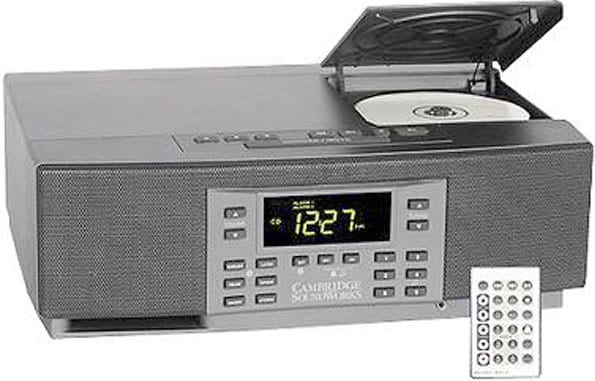
And for others, here's an upgrade file...
https://www.hifi-remote.com/forums/dload ... e_id=13788
Posted: Sat Dec 19, 2015 11:50 am
by alanrichey
Sorry, those codes were actually triggering my TV and my wife was complaining as it kept changing channel. So didn't get a chance with the Volume buttons

Vol+ 01
Vol- 03
Posted: Sat Dec 19, 2015 1:26 pm
by The Robman
alanrichey wrote:Sorry, those codes were actually triggering my TV and my wife was complaining as it kept changing channel. So didn't get a chance with the Volume buttons
Vol+ 01
Vol- 03
The perils of JP1ing at home!

Was there no mute button?
I just added the EFCs to the list above.
Posted: Sat Dec 19, 2015 1:50 pm
by alanrichey
Afraid not