Page 1 of 2
351101 OFA Essence 4 / URC7140 not recognized
Posted: Tue Jan 13, 2015 4:20 pm
by Lightning
Dear All,
I hope someone can help me with this very problem.
I bought a One For All OFA Essence 4 of the German Amazon store (I live in Austria):
http://www.amazon.de/gp/product/B003NSI ... ge_o00_s00
Allthough I tought I did my homework and tried to make sure the remote I'm going for is supported by JP1 software I'm now running into a lot of trouble.
I'm using a simple FTDI TTL-232R-3V3-WE USB to TTL cable to connect to the remote.
http://uk.farnell.com/ftdi/ttl-232r-3v3 ... dp/1740365
The connection itself is working fine as far as I can tell, but for some reason I get the following error:
No RDF matches signature starting 3511
I've searched for every combination of this error message I could think of but haven't found any useful solution. I also tried to rename the file
326605 (URC-7120_7130_7140 OFA Essence).rdf
to
3511 (URC-7120_7130_7140 OFA Essence).rdf
which led to this error
Error downloading from remote.
This may well be the result of a bug in the RMIR software. To help us, please
do a raw download as follows. Close RMIR, re-open it and click on "Raw download"
on the Remote menu. Click the Download button on the window that then opens.
When the download finishes, click Save. Accept the default filename that is offered.
Then post the resulting file in the JP1 Softwareforum for the experts to examine.
To get you as much information as possible I took the remote apart, below you can find pictures from all stickers and lables I found on the device.
 https://picasaweb.google.com/lh/photo/g ... directlink
 https://picasaweb.google.com/lh/photo/- ... directlink
Furthermore I hooked up my USBee DX Logic Analyzer to the TTL communication lines and captured a real raw copy of the data send back and forth between PC and RC.
The communication took place at 38400 boud, The decode as well as the original files can be found at:
https://www.dropbox.com/sh/002v8755mzyn ... NigNa?dl=0
To view the orginal file you can download a demo version of the USBee DX software at
http://www.usbee.com/usbeesuitesw.zip
The RM Software Version used is:
RemoteMaster v2.03 Alpha 27
The RDFs are from SVN:
svn checkout svn://svn.code.sf.net/p/controlremote/code/trunk controlremote-code
//SNIP
Checked out revision 1292.
I hope someone can help me to get this remote running.
If you need any further information please let me know, I'll try to get what's needed!!
Regards
Posted: Wed Jan 14, 2015 12:09 pm
by mathdon
It seems likely that your remote has a revised version of the firmware for the URC-7140 that we have not seen before. We have come across other remotes with a 6-digit signature that have had firmware revisions that have been given a new signature. So here is something you can try.
The signature of the remote is the numeric part that begins the name of the RDF file. As I think you have found out, there is no RDF file whose name begins 3511. The full signature for your remote will be six digits, like the 326605 in the file name of the existing RDF for the URC-7140. The 5th digit is almost certainly 0. You need to find the 6th digit. If you then replace the 326605 in the RDF file name with the 6-digit signature of your remote, it will at least find the RDF. If this is a firmware revision, there is a good chance that the same RDF will work.
You have two choices to find the 6th digit. The simplest is to try 1 to 9 (and possibly 0) in turn in the file name and see which one, if any, is recognised. The other is to read the signature from the remote. Here is a method that may work. Again, without having the remote, I can't be sure, but worth a try.
- Press and hold Setup for about 3 seconds until the LED flashes twice.
Enter 983 with the digit keys. The LED will flash twice on the final digit.
Press in turn the digits 1 to 5 and count the LED flashes each time.
The number of flashes gives you the first four digits and the sixth one (as I said above, the fifth one should be 0).
Good luck!
Posted: Wed Jan 14, 2015 4:04 pm
by yaworski
I was able to get the signature just by looking for ascii codes for 3511 in the csv files from the logic analyzer (the raw download one).
Here is a part where the signature is:
Code: Select all
+287,5us,Async TTL,RX from URC7140,33
+289us,Async TTL,RX from URC7140,35
+289,25us,Async TTL,RX from URC7140,31
+289us,Async TTL,RX from URC7140,31
+289,25us,Async TTL,RX from URC7140,30
+289,25us,Async TTL,RX from URC7140,31
As you can see the signature is 351101.
Posted: Wed Jan 14, 2015 4:22 pm
by Lightning
Hi,
I followed your recommendation and tried the
Enter 983 with the digit keys
trick. Generaly it worked but the pinged back code was somewhat ambigous as the 5th digit could be interpreted as 1 or 2 (the led does a second short blink before it goes off completely) so I tried to find the transmited signature in the data stream. I think I found what I was looking for in an ASCII decode of the datastream in the 3rd transmission block when attempting a normal "Download from the attached remote":
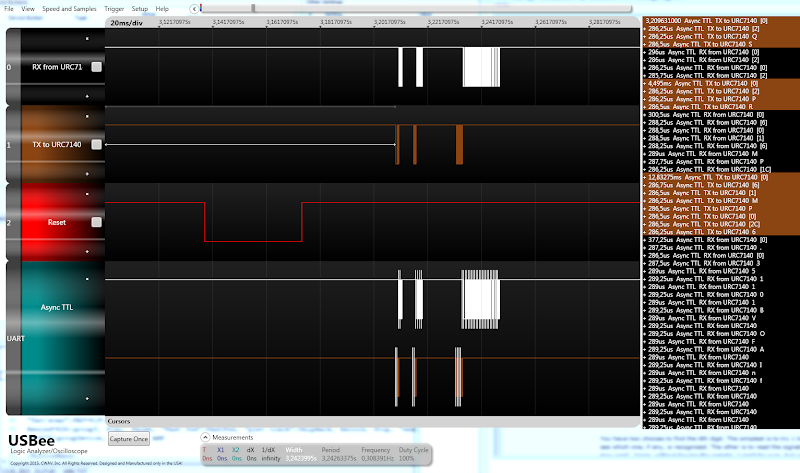 https://picasaweb.google.com/lh/photo/o ... directlink
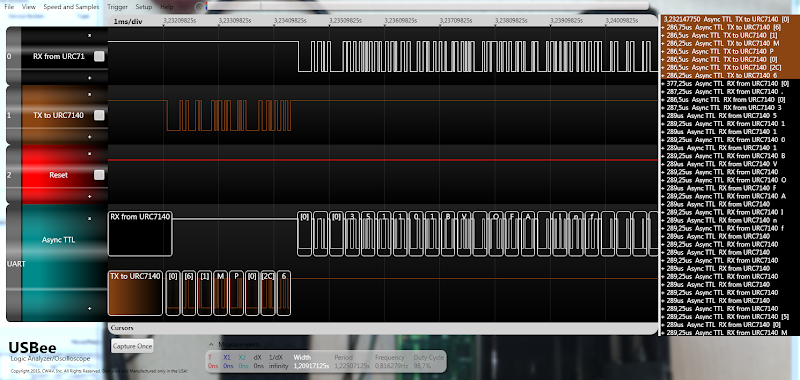 https://picasaweb.google.com/lh/photo/H ... directlink
With the correct signature confirmed I made a copy of the original RDF file and renamed it to
351101 (URC-7120_7130_7140 OFA Essence).rdf
however the result was the same as mentioned in my initial post with the file name starting with only the 4 digits
3511 (URC-7120_7130_7140 OFA Essence).rdf
From the Dropdown I choose the 7140 (the other two options don't make a difference):

to get this error:
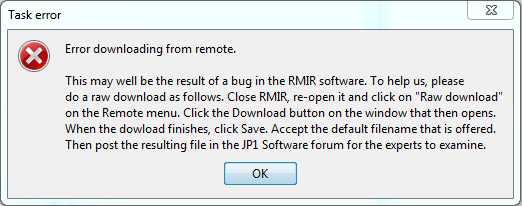
the rmaster err file can be found here or in the dropbox folder mentioned in the first post
https://www.dropbox.com/s/6m2wbbzm9ay4e ... r.err?dl=0
Is there anything else I could do??
thanks for your help so far!!
regards
Posted: Wed Jan 14, 2015 4:24 pm
by Lightning
...
Posted: Wed Jan 14, 2015 4:25 pm
by Lightning
yaworski wrote:I was able to get the signature just by looking for ascii codes for 3511 in the csv files from the login analyzer (the raw download one).
Here is a part where the signature is:
Code: Select all
+287,5us,Async TTL,RX from URC7140,33
+289us,Async TTL,RX from URC7140,35
+289,25us,Async TTL,RX from URC7140,31
+289us,Async TTL,RX from URC7140,31
+289,25us,Async TTL,RX from URC7140,30
+289,25us,Async TTL,RX from URC7140,31
As you can see the signature is 351101.
hi yaworski,
thanks for your reply.. only saw it after I posted mine... but at least we both found the same thing...

cheers
Posted: Wed Jan 14, 2015 4:29 pm
by mathdon
Lightning wrote:Is there anything else I could do??
Yes, do what the message says. Create a raw download file and post it for us to look at.
Posted: Wed Jan 14, 2015 4:49 pm
by Lightning
Hi mathdon,
Sorry, probably that was unclear in my fist post but the raw download is already in the dropbox folder:
https://www.dropbox.com/sh/002v8755mzyn ... NigNa?dl=0
- 20150113_3511.ir 18.176 13.01.2015 22:39 -a--
20150113_normal-download-attempt.csv 3.276 13.01.2015 22:37 -a--
20150113_normal-download-attempt.usbeecomp 3.576.793 13.01.2015 22:36 -a--
20150113_raw-download-attempt.csv 175.926 13.01.2015 22:39 -a--
20150113_raw-download-attempt.usbeecomp 3.617.635 13.01.2015 22:40 -a--
20150114_Ambigous-Remote.PNG 20.414 14.01.2015 23:10 -a--
20150114_rmaster.err 41.420 14.01.2015 23:07 -a--
20150114_Task-error.PNG 16.056 14.01.2015 23:10 -a--
20150114_USBee-Screenshot-2-Signature-ASCII.PNG 323.225 14.01.2015 22:50 -a--
20150114_USBee-Screenshot-Signature-ASCII.PNG 413.010 14.01.2015 22:34 -a--
rmaster.err 41.354 13.01.2015 22:42 -a--
Code: Select all
EC00:  C9  36  00  10  00  FF  79  00  00  FF  FF  FF  00  00  00  FF
EC10:  FF  FF  00  10  00  FF  7A  00  01  FF  FF  FF  00  00  00  FF
EC20:  FF  FF  00  10  00  FF  7B  00  02  FF  FF  FF  00  00  00  FF
EC30:  FF  FF  00  10  00  FF  7C  00  03  FF  FF  FF  00  00  00  FF
EC40:  FF  FF  00  0A  DA  FF  00  00  79  7A  7B  7C  00  0C  DB  FF
EC50:  00  04  FF  FF  FF  FF  FF  FF  00  08  C8  FF  00  00  00  FF
EC60:  00  1B  09  FF  79  03  00  D1  81  A2  12  23  33  33  22  32
EC70:  32  32  33  33  32  33  22  22  23  22  30  00  1B  09  FF  79
EC80:  0F  00  D2  81  A2  12  23  33  33  22  32  32  32  32  22  22
EC90:  22  23  33  33  33  30  00  2D  09  FF  79  0D  00  D2  81  32
ECA0:  12  23  33  33  22  32  32  32  32  22  22  22  23  33  33  33
ECB0:  30  12  23  33  33  22  32  32  32  12  32  22  22  22  23  33
ECC0:  33  33  30  00  2D  09  FF  79  0B  00  D1  81  32  12  23  33
ECD0:  33  22  32  32  32  32  22  22  22  23  33  33  33  30  12  23
ECE0:  33  33  22  32  32  32  12  32  22  22  22  23  33  33  33  30
ECF0:  FF  FF  FF  FF  FF  FF  FF  FF  FF  FF  FF  FF  FF  FF  FF  FF
ED00:  FF  FF  FF  FF  FF  FF  FF  FF  FF  FF  FF  FF  FF  FF  FF  FF

all FFs between ED00 and FBF0

FBF0:  FF  FF  FF  FF  FF  FF  FF  FF  FF  FF  FF  FF  FF  FF  FF  FF
regards
Posted: Wed Jan 14, 2015 7:51 pm
by 3FG
Lightning,
Have you checked your private messages?
Posted: Thu Jan 15, 2015 12:12 pm
by mathdon
Lightning wrote:the raw download is already in the dropbox folder
Thanks. This is very strange. There is nothing wrong with the raw download. I can load it into RMIR and see that it contains nothing but four learned signals. If you want to do this yourself, edit the file to put four extra lines at the start, thus:
Code: Select all
[Signature]
0000:  33 32 36 36 30 35

[Buffer]
EC00:  C9  36  00  10  00  FF  79  00  00  FF  FF  FF  00  00  00  FF
...
This will then load, using the RDF with signature 326605. As you see, the first block is just the signature in ASCII, so you can change this to the signature of your remote and use your modified RDF if you like.
Posted: Fri Jan 16, 2015 11:08 pm
by 3FG
Lightning,
Looking at your raw data, it looks like you need to make another change besides just the name of the RDF file. Change the line
to
Probably that will allow you to download from the remote.
However, I recommend against uploading until we get more info. The revised firmware probably has different setup codes, and perhaps executors or number tables.
Posted: Sat Jan 17, 2015 6:16 am
by Lightning
Hi 3FG,
your advice worked, download now works!!

And the data displayed so far appears to be consistent as well.
I haven't tried an upload yet for the very reason you mention in your post... not interested in a bricked remote although this particular model is not that much expensive (€13,40 @ Amazon)

Please let me know when you think it will be safe to upload configs to this remote.
cheers
Lightning
Posted: Sat Jan 17, 2015 10:42 am
by 3FG
The OneForAll site suggests that the 7140 has been made in versions 7140, 7140R01 and 7140R02. Please look at the label inside the battery compartment to see whether your remote is R01 or R02.
me 2!
Posted: Sun Apr 12, 2015 12:58 pm
by supertommy
i m going to buy the same remote because in europe is one of the most
cheaper and available...
i think i will get the same version.. there is any news about using it with
our software??
let me know please before i buy
Posted: Sun Apr 12, 2015 7:16 pm
by 3FG
Yes, it works with our software. Make sure that you use a recent version of RMIR 2.03, so that you get the RDF file.