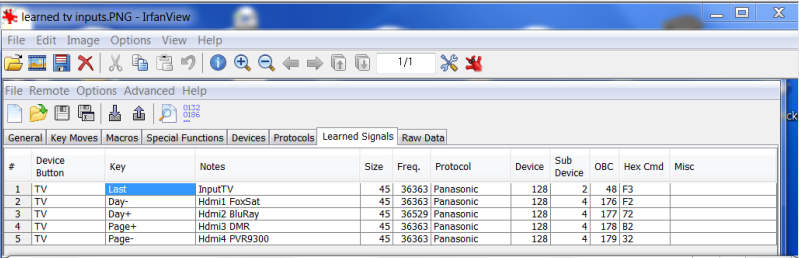
tranx wrote:vickyg2003 wrote:...One of the things keymoves can do is allow you to stack keys with shifted keys and if you are using a modern extender x-shifted keys. This allows you to map 40 keys to a 30 key remote...
Could you expand upon that? (I have come across keys stacked with shifted keys, where no keymoves were in evidence).
When we assign functions to buttons while creating an upgrade, there are only certain keys available without doing a keymove. The list of keys available in the upgrade depend on what "device type" was selected in RM or KM. In the more modern remotes the list of keys availabe by device type is more extensive than it was in earlier remotes, so you probably won't notice it as much. In US remotes, there are usually not shifted keys available in the device type keymap, while European remotes might have 2 or 4 shifted keys in a keymap. So typically a shifted keys can only be used by macros or keymoves.
In the KeyMove panel what is the purpose of the choice between 'EFC-5', 'Hex', and 'Key' please? i.e. why not just go for 'Key'? is it that 'EFC-5' adds the KeyMove as an available function, perhaps for a macro or phantom key? and what is the use for 'Hex' there?
Typically Keymoves are either EFC or Key. Key was introduced at the same time as UEI went from using 3 digit EFC's to 5 digit EFCs. Ealier remotes don't have the Key option. If a function is assigned to a key, either in an an upgrade, or in the a built-in setup code, then the UEI remote will look up the key value in the setup code. If the function is not available in an upgrade, then you can use an EFC style keymove, and the function doesn't have to be assigned. Key style keymoves take one less byte to set up. The only time I have used HEX style keymoves, was when I was writing new special protocols so I'm not sure what the average user uses Hex for, but I'll bet there is a reason to do that too.
The second thing it allows is to create an activity based remote...
Have played with MX500, Philips USB, and Harmony remotes but don't like lcds. Although the activity thing is not so much a hurdle I have rather retreated to plenty of easily recognised/remembered buttons.
I find a neat arrangement in a pattern is preferable to peering at a screen and pressing buttons just to navigate; currently quite like the device buttons to change inputs so power buttons can stay with their own devices, except for macro buttons for progressive In and Out of standby,
with mains power controls to turn off various parts of the permanent Christmas tree

You and me both. I tried a kameleon for a bit, and couldn't stand having to look down at the screen all the time. I'm a hard button remote user.
With the RCA remote that you are using, you'd have a lot less reason to use keymoves for punch through than most of us. But still there are typically a few keys that you need access to in many device modes. IE when I'm in DVD mode, I typically need access to the aspect ratio key of my TV. So I keymove that into DVD, VCR, and AUX, so that I can always change the aspect button without toggling away from the mode I chose. Its kind of like
Volume
Punch
Through, only for aspect ratio.
...You can use certain function from TV mode and keymove them into DVD mode...
Now that is interesting too. At first I seemed to get away with learning a few functions from strange devices but stopped doing it as soon as I saw that RMIR chooses new protocols, and that OBCs can be missing: guessed that it would be bad news even if they
were used to make the strangers native - so backed off quick because of those bad vibes.
I'm not sure what you are saying here. I only use RMIR as a tester, I much prefer IR, so its probably that I'm just not as familar with the software to figure this out
...keymoves are the foundation for extenders, DSM's, LKP's, Pauses, ToadTogs....Keymoves rule!
DSMs are available on undoctored RCRP05B but have not discovered if they are still feasible with JP1 upgrades...
Ah yes, forgot that the RCA can do a native DSM, most remotes can't do that.
I understand what ToadTogs might do because Harmony keeps count like that, but what are LKPs please?
LKP stands for Long Key Presses. DKP for doubll keypresses. Extenders usually come bundled with the LKP/DKP protocol. I don't like the DKP, because most of my users aren't quick enough to get the DKP to work, but the LKP is an absolute must have. What the LKP/DKP does is to allow you to run different strings of operations depending on how you press a key. I'm not a big toadtog person since I use multiple remotes at each location, but they can be fun too as long as they don't get out of synch.
Pauses are indeed a good incentive to venture into that territory but did spot a couple of 'bricked it with extender' posts

The pause shouldn't be able to brick a remote, but there are a few operations that can. When installing JP1.3 extenders, changing the macro speed, changing the leds that flash for phantoms, you can brick a remote if you are not paying close attention. Follow the directions carefully. The biggest thing here is to use FRESH BATTERIES, and to be using name brand batteries, not those knock off brands that are sold at the dollar store, and don't fit snuggly into the battery compartment. Momentary low voltage is a real problem in these operations.
In devices, are the Devs 4/5/6 sort-of phantom devices, which I suppose might be called by a spare key, or in a macro?
Regards
The RCA thinks its an 8 device remote. It just doesn't have 8 phyiscal buttons. So yes setting them up as a spare key works. Typically you set up a macro on a shifted-device key that just says Dev-5, and then its as if you were in another device mode.