Page 1 of 3
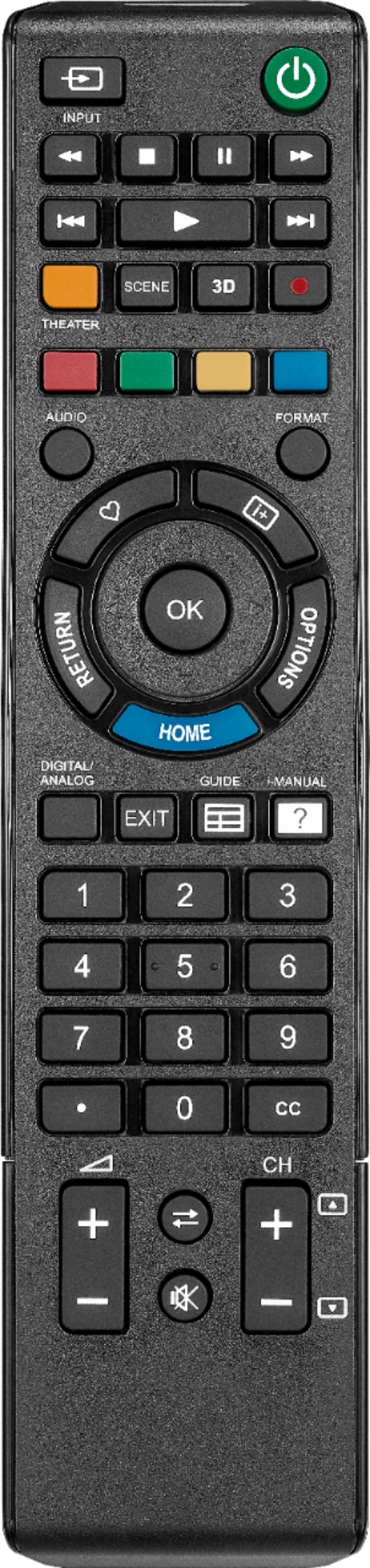
361701 New Insignia Sony NS-RMTSNY17
Posted: Fri Mar 25, 2022 6:15 pm
by SleepyBum
Insignia Sony NS-RMTSNY17 3617
URC67800BE0-001-R
20I21E or 20l21E ?? not sure if I or lowercase L
*edit*
I think it's clone of this URC 1912:
https://www.oneforall.com/universal-rem ... ent-remote
New remote on clearance right now. I think it might be JP1 compatible.
Seems like it has learning capabilities, 975 code.
https://www.bestbuy.com/site/insignia-r ... Id=5807803
https://www.insigniaproducts.com/pdp/NS ... 17/5807803
Manual:
https://files.bbystatic.com/prTaq2MGVIz ... 3a9e0e.pdf
Hi-res remote image:
https://pisces.bbystatic.com/image2/Bes ... 3cv11d.jpg
Has a 6-pin connector. JP1.3 or JP1.4 ??? I have a picture of the battery compartment, but don't see an option to attach images.
https://i.imgur.com/sA37tC7.jpg
top of remote
pinout
6 5
4 3
2 1
RMIR reports: "No RDF matches signature starting 3617"
Raw Download:
https://www.hifi-remote.com/forums/dload ... e_id=26520
Posted: Sat Mar 26, 2022 11:19 am
by MrMoody
Apparently single device, no setup button, no instructions even to change the code other than using Power scan. Will be interesting to see what's hidden in it. Might have some use if it's cheap enough. Bedroom TV, office audio, maybe use for a learner only ...
Posted: Sat Mar 26, 2022 12:32 pm
by mathdon
Is it really worth the effort of creating an RDF for a single-device remote intended only to support Sony TVs, even though it is a JP1.4 remote?
Posted: Sat Mar 26, 2022 12:39 pm
by MrMoody
Presumably it could be made to operate other brands using JP1, but whether it's worth it would be up to the person who has to create the RDF ...
Tangential question: How do you read a raw file with RMIR, or is there some other tool?
Posted: Sun Mar 27, 2022 6:47 am
by mathdon
MrMoody wrote:whether it's worth it would be up to the person who has to create the RDF ...
That would be me. My question was an offer to anyone to persuade me it would be worth while. It would require quite an effort both on my part and that of SleepyBum as the raw download does not contain enough info for the creation of an RDF. In my view, not worth the effort.
How do you read a raw file with RMIR, or is there some other tool?
Remote >Raw download. RMIR does not require an RDF to create a raw download.
Posted: Sun Mar 27, 2022 9:11 am
by MrMoody
It's probably not worth it if it can't be done pretty easily. Without device buttons, it's pretty much only good for one device or maybe something like mixed TV+Streamer. Add to that the fact that it's a Best Buy brand on clearance and probably won't be available for long.
I could use it for my bluetooth amp at work that didn't come with a remote, instead of the 67100 I'm using now, but that's probably an unusual case.
I already knew how to make a raw download from a remote, I was asking how to read someone else's raw .ir file. Are you guys just using a hex editor or is there a tool?
Posted: Sun Mar 27, 2022 12:15 pm
by mathdon
MrMoody wrote:I already knew how to make a raw download from a remote, I was asking how to read someone else's raw .ir file. Are you guys just using a hex editor or is there a tool?
Like a .rmir file, a raw download .ir file is a text file. For JP1.4, JP2 and later remotes, at the end of the raw download file there is a section [RDF Data] giving pretty much everything that can be extracted that is useful in creating an RDF. So no tool required. But as I am sure you know, a raw download is just one small step towards creating an RDF. The whole process is a collaborative effort between the expert and the user, often with many steps to work gradually towards a full working RDF. So "pretty easily" is rarely the case.
Posted: Sun Mar 27, 2022 12:35 pm
by The Robman
When I do RDFs, I open the *.ir files using Notepad, there isn't really a "tool" to open them because that's not what they're designed for. The purpose is to give the RDF developer as much info as possible to help them create an RDF.
Posted: Sun Mar 27, 2022 2:00 pm
by SleepyBum
I was hoping for an easy way to reprogram it with RMIR without using the 975 code learning. I have the codes from my other JP1 remote 1060BC3. I think it's a nice small remote with a clean layout.
I wanted the volume buttons to control my Logitech speakers and my A/C mapped the DVR functions buttons. Also, hoping to use the 4 color buttons for macros.
This is one of the cheapest learning remotes I've found, so hoping there's an easy way to extract learnt codes as well.
This should be an exact clone of the Urc 1812 / URC 1912, which is still available on amazon.
https://www.amazon.com/One-All-Sony-Rep ... 07NZ1MHXY/
Posted: Sun Mar 27, 2022 2:26 pm
by MrMoody
Ah, thanks, I should have poked into the file before assuming it was literally raw downloaded data.
I know a lot of this stuff, but there's a lot I don't know, too, that I haven't found documented anywhere. For example, how do you derive the maps, protocols, setup codes?
@SleepyBum, the onn 6-device remote at Walmart is only $.89 more and is already supported.
Posted: Sun Mar 27, 2022 6:48 pm
by The Robman
@SleepyBum, I will create an RDF for you if you're willing to help in the process. Just let me know.
Posted: Sun Mar 27, 2022 7:00 pm
by SleepyBum
@The Robman, sure let me know what I need to do.
I've used RMIR to program my Charter OCAP 1060BC3 long time ago, so I haven't touched it since. Setup with 3 devices, Sony TV, Logitech speakers, and a Haier A/C. Volume punch through for the speakers and some macros, discrete inputs.
Works fine, no problems. Just wanted a smaller remote. This one is almost identical to the original Sony TV remote I have and has a similar button layout.
Also wanted to remap some buttons to discrete inputs, HDMI 1, HDMI 2, which I've done on the 1060BC3. Volume punch through for Logitech speakers. I'm mostly satisfied with the 1060BC3, but it's huge and heavy. I have extras as backup.
@MrMoody, I saw the thread on the Onn 6-device remote at Walmart. Does it have learning? That's the feature I'm interested in the most, so I can pull codes not available for things like Air Conditioners. I might pick one up to play with though.
Posted: Sun Mar 27, 2022 7:25 pm
by MrMoody
SleepyBum wrote:
@MrMoody, I saw the thread on the Onn 6-device remote at Walmart. Does it have learning? That's the feature I'm interested in the most, so I can pull codes not available for things like Air Conditioners. I might pick one up to play with though.
Yes, it does have learning.
Posted: Mon Mar 28, 2022 7:55 am
by The Robman
SleepyBum wrote:@The Robman, sure let me know what I need to do.
You probably haven't noticed the link at the top of the page to your Private Messages, as I had already sent you a PM before posting here. I have sent you instructions via PM.
Posted: Mon Mar 28, 2022 3:30 pm
by SleepyBum
MrMoody wrote:Yes, it does have learning.
Excellent. Thanks for the tip. Great price for a learning remote.
The closest Walmarts to me seem to be out of stock, but a few further away seems to have some. I'll check anyways next time I'm in store.
@The Robman, didn't notice there were private messages, have replied.