Expert answers will be interesting to me too but meanwhile here goes:
1. It seems that macros are mostly global? It doesn't matter if you are in the TV device or PVR device, if you have assigned a macro to a key, it will perform those key presses.
- RMIR's tab 'macro' lets you set up the global macros
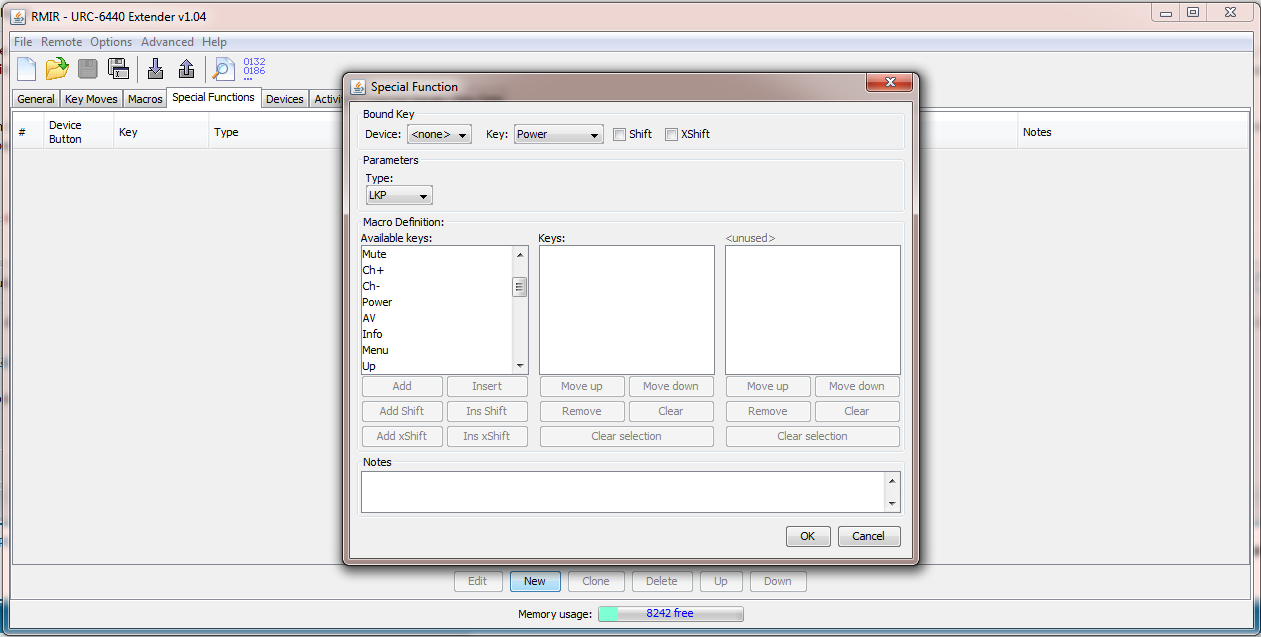
- and the tab 'special functions' lets you set up Device Specific Macros, 'DSM's
1.a. But this doesn't apply in activities? (I think this might be what I didn't understand earlier)
- right, but this restriction has been removed in the extender
- one method of switching between macro functions and normally assigned functions of a device is to set all the button groups in an activity to the same device (except perhaps the volume controls and see the Volume PunchThroughs in the general tab), and to use the relevant combi/activity and device buttons as the switches
1.b. Therefore if I apply a macro to the button 1, this button is now not usable as a number 1 in any device mode?
- right, unless you use a DSM, which would only work in the chosen device mode, or unless you put a keymove (which takes precedence) on the same button
- it would be worthwhile to review the the order of precedence, which is in the extender manual
2. Following on from question 1, which buttons do most people use for macros? Shifted buttons?
- without the extender there is no shift button, but the shifted buttons can still carry functions to which macros can refer.
- with the extender the choice might be to put the most used function/macro on the un-shifted button
3. How do I create a macro on a button whilst the control is in an activity?
- good question...I can't remember but you could try having a keymove there which refers to a macro, although I doubt if that would work either
 4. The macro manu in RMIR has a tick box for "shift" next to the bound key. I thought this would only be available with the extender?
- a macro on a shifted button can be accessed with a keymove (without the extender, macros can't be nested)
5. How do I create a macros which involve several devices? The available keys in the macro list are not associated with a particular device.
- in 9. you asked: "You can also select Key=PVR, when would this be used?", and this is where 'Key=PVR' comes in, i.e. to set/change the device which applies to the functions which follow in a macro
6. How do I create a macro to go to a specific HDMI input, eg.HDMI3? (requires state tracking?). This is being used on the TV device, so will it be necessary to press the TV button before pressing the button this macro is assigned to?
- a macro may not be needed because 'discrete' functions are usually available for changing inputs, and could be keymoved from another device, but if not then a macro might be needed to negotiate the input menu/s, and see 5. for the second part (to change device in a macro)
7. What are the ticked boxes under the activities tab?
- I think they determine whether pressing that combi-button issues a power command for the devices which have boxes ticked
(also provided that those devices feature under the 'device' heading of the button group assignments)
8. Will a Flirc dongle be best for sending PC commands? (as opposed to a different infra-red dongle)
- I think so because I believe flirc can learn to respond to most IR signals, so you would not necessarily need a unique upgrade just to control the pc
9. Special functions are only functions/macros that occur when you are using a particular device?
- yes, and while DSMs are the only ones on offer but with the extender other special functions are available: Pause, LKP, DKP, ToadTog, Multiplex
- it is also remarkable that the extender can render a DSM global, by selecting 'none' in the the special functions device box
9.a. I see that you can select Device=TV and then Key=WatchMovie...so this lets you assign a macro to the WatchMovie button?
- yes
- perhaps not in the case of a macro on a combi-button, but it might be necessary to add the device key (such as DVD) to the end of a macro which has selected a TV input (from the DVD)
9.b. You can also select Key=PVR, when would this be used? It seems it would get rid of the PVR device and replace the physical button with one function (if pressed after pressing TV?)?
- using the key PVR is equivalent to pressing that device button, and see 5. for the first part. If still needed, could you rephrase the second part please?