Page 4 of 5
Posted: Mon Apr 25, 2016 6:59 am
by mdavej
Low batteries or plug orientation is what I would check first.
Posted: Mon Apr 25, 2016 10:17 am
by smbs
Thanx---was using a usb to serial
Changed to computer with serial and managed to upload but still having problems--will return with questions
Once again many thanx
Regarding bricked Rca I tried Vicky's suggestion ---the Rca show some life lights started flickering but would not stop so removed the battery after returning battery and trying again Vicky's suggestion nothing happens completely dead. Looking back I might have inserted the 6 pin connection in the wrong orientation --could that cause bricking maybe there is still a solution out there ?
Posted: Wed Apr 27, 2016 7:34 am
by vickyg2003
I've had terrible luck with bricking this RCA model. I think the 6 pin connector is too fragile. With any other remote I would say remove the battery press a button, replace the new batteries hold down the setup button until you get two flashes and then type 981.
Posted: Thu Apr 28, 2016 8:32 am
by mdavej
Here are a few more things to try, especially 3FG's File-New on the second page:
https://www.hifi-remote.com/forums/viewt ... 621#p107621
Posted: Thu Apr 28, 2016 11:40 am
by chuliu
If all else fail, just send the bricked RCA remote to RCA for replacement.
If I remember correctly, they come with a life time warranty.
I do doubt if many people really utilize their life time warranty.
I bricked two of them myself and since then I have refrained from buying any more of them. IMHO, nevo c2 or OARUSB04G is some better options.
If you don't need the functions of an extender, go for nevo c2.
It has a lcd and supports 18( or 15) devices at most. Also, it has built in usb socket for JP1 software compatibility. The lcd comes in handy in that you can have on-screen buttons and name whatever you want them to be. Also, lcd helps to remind you which device is which.
I have also got two of OARUSB04G myself. I read about its extended function with installation of an extender. I haven't been able to try it myself. I am still limited to 4 devices on it. It has good look and feel good when touching it. Unlike c2, it seems very battery saving.
Posted: Fri Apr 29, 2016 8:41 am
by smbs
3FG wrote:It's true that we don't know the meaning of every byte in the RCRP05B E2 area. However, it isn't necessary to fiddle with the Raw Data just to get to a functioning E2 image.
The
current version of the RCRP05B RDF file, if used with RMIR and File/New/RemoteImage, will make a functioning remote image which can be uploaded.
Thanx for all replies--- clicking above link gives me "file not found"
Posted: Fri Apr 29, 2016 8:47 am
by mdavej
It's already included in the Remote Master package you have. Just go ahead and try the File/New procedure.
Posted: Fri Apr 29, 2016 9:36 am
by smbs
mdavej wrote:It's already included in the Remote Master package you have. Just go ahead and try the File/New procedure.
Sorry for my ignorance but I cannot find in Remote master menu "File/New Procedure" ---
Thanx for your patience!!!
Ok its in rmir but get no remote found when uploading!
Posted: Fri Apr 29, 2016 10:09 am
by mdavej
RMIR, not Remote Master
"Procedure" is a noun for the steps after File - New that 3FG posted, not an actual menu item. I even put it in lower case, spaced away from "New". I was just trying to save a little typing effort on my phone. That obviously failed.
File - New - Remote Image - Yes (then pick your RCA model number from the list). Then plug in your remote and click the Upload button.
Posted: Fri Apr 29, 2016 12:54 pm
by smbs
smbs wrote:mdavej wrote:It's already included in the Remote Master package you have. Just go ahead and try the File/New procedure.
Sorry for my ignorance but I cannot find in Remote master menu "File/New Procedure" ---
Thanx for your patience!!!
Ok its in rmir but get no remote found when uploading!
Mdavej ---you have the patience of a saint!!
However u didn't notice my last sentence in my last post!
Quote
"Ok its in rmir but get "no remote found" when uploading!"
Once again many thanx for your patience
Posted: Fri Apr 29, 2016 1:00 pm
by mdavej
No I didn't see that. My brain stopped at "procedure".
Since you've tried everything else (batteries, 981 reset, etc.), it's time to pronounce your RCA dead I'm afraid.
Posted: Fri Apr 29, 2016 1:24 pm
by smbs
Rca dead ---well all good things come to an end!
I am an "old fart" who has just been pensioned off---I am new to Jp remotes and trying to learn something new. BTW I have ordered the the adapter for my 8910 which u recommended as the 8910 is JP1 compatible ---so be warned
More Questions may not be too far away!!!!

Bye for now
Posted: Fri Apr 29, 2016 2:31 pm
by mdavej
No problem. Sorry if I got a little testy with you.
Posted: Fri Apr 29, 2016 4:08 pm
by 3FG
Well, there is one more thing to try. The idea here is to discover if the remote responds to the serial interface at all. If it doesn't, then we can declare the remote to be dead.
Get
Tommy Tyler's instructions on how to identify an unknown flash remote. Try to put the remote into communications mode, and see if it will respond by outputtin its signature (Command "V" should result in 31793179). Note however, in Tommy's instructions, he says that setting and then clearing RTS should cause the remote to blink twice; that's true for a healthy remote, but in your case you should proceed even if you don't get the two blinks.
Posted: Sat Apr 30, 2016 2:54 am
by smbs
Tried using Tommy Tyler's instructions.
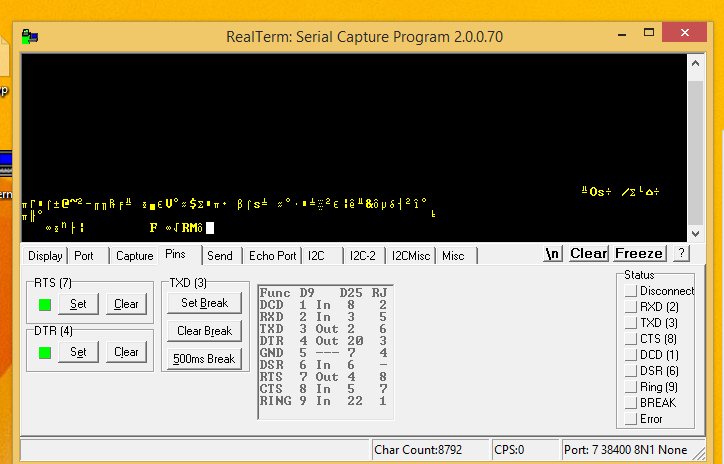
After plugging in the remote to the interface cable, the terminal window shows characters which are being constantly transmitted by remote. Status buttons on right side of terminal window RXD and TXD flash yellow every time letters are seen in term window see attached picture
http://imageshack.com/a/img921/5771/BuHMpy.png
Pressing RTS clear button stops transmitting . Inputting "I" or "V" have no consequences.