Page 2 of 2
Posted: Mon Jan 11, 2016 8:01 pm
by The Robman
Read this for the pinout of the Chinese cable:
https://www.hifi-remote.com/forums/viewtopic.php?t=16360
I dunno about the adapter.
Posted: Mon Jan 11, 2016 8:57 pm
by prelude
Hi, TheRic:
I am the owner of diygadget.com.
Rob sent me an email today and pointed me to this thread. I am sorry for the confusion. I have updated the FAQ so you can determine which pin is pin 1 etc. Please let me know if you have any questions. As always, you can open ticket at
www.csbooth.com (we only reply tickets on earlier mornings of Monday, Wednesday and Friday).
BTW, thanks for ordering from us! also, we are located in Canada. All Canadian and international orders are shipped from Toronto, Canada, and all USA orders are shipped from Buffalo, NY.
Here is the page:
http://www.tiaowiki.com/w/JP1,_JP1.1,_J ... _Questions
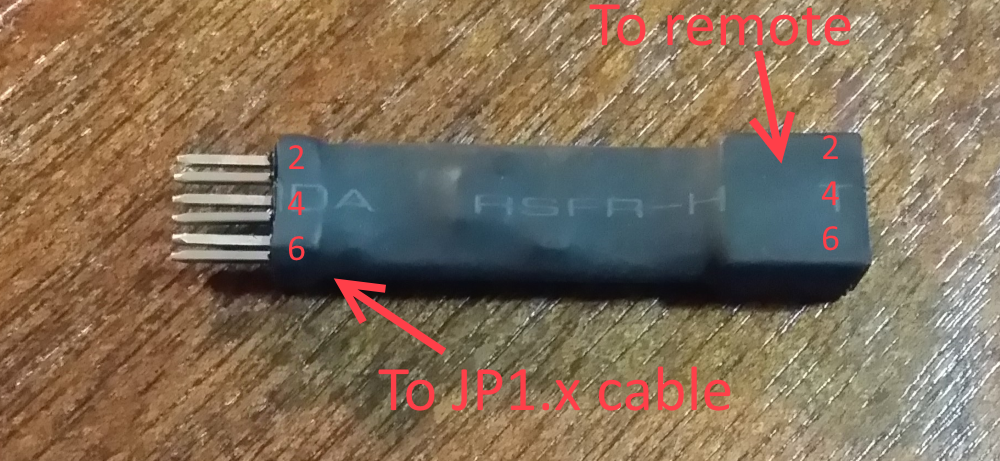
Posted: Mon Jan 11, 2016 9:37 pm
by The Robman
prelude wrote:Hi, TheRic:
I am the owner of diygadget.com.
Thanks for responding so quickly.
Posted: Mon Jan 11, 2016 11:22 pm
by TheRic
YES!!!
Finally able to communicate with my remotes!!!
FYI: The 8810 and 8910 do NOT say what pin number is which. The adapter I got had no markings, and the USB cable had 6 individual pins. SO I had nothing to even figure out where to start. With the help here I was able to communicate with my remotes!
Prelude: A suggestion that might help things. Use a Silver Sharpie to tag pins 1. It's what I did after I saw your picture, which was a BIG help!!
Robman: Thanks for your links and contacting Prelude!
Would also like to think everyone else that post suggestions.
Now for the fun part, figuring out / finding my way around the programs. And the most important part, programing my remote to do what I want it to.
Posted: Tue Jan 12, 2016 5:40 am
by prelude
Prelude: A suggestion that might help things. Use a Silver Sharpie to tag pins 1. It's what I did after I saw your picture, which was a BIG help!!
Thanks! Will do it.