red & blue flecks in VHS images

If you have an electronic device that is in need of some repair, and you're willing to do the repair yourself, use this forum for advice from other electronics experts.

Moderator: Moderators

Post Reply
av-geek
Posts: 1
Joined: Tue Jan 02, 2007 10:26 pm

red & blue flecks in VHS images

Post by av-geek »

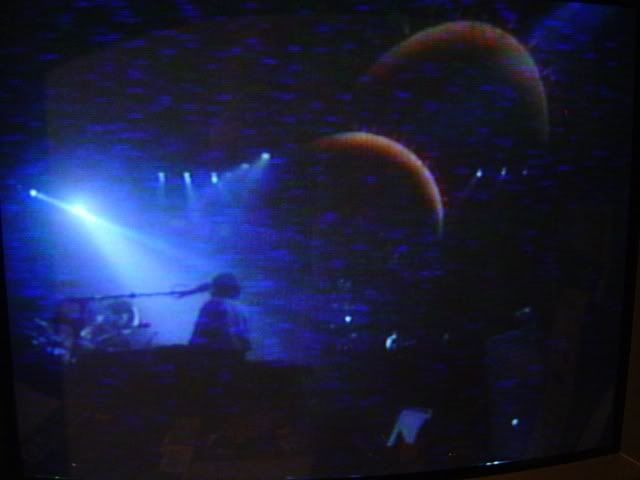
Greetings everyone! I've seeked out this forum to see if any of you all can help me with a VCR problem. Yes, I know, they're old technology, but I've still got a big collection of VHS tapes, and I've got some nice equipment around the house here. One of those nice devices is a Panasonic AG5710 SVHS editing deck that doesn't seem to like pre-recorded tapes. This is a screen shot of Pink Floyd "Delicate Sound of Thunder" I picked this tape because there is plenty of dark scenes in it, but other pre-recorded VHS movie tapes and stuff produce the same results. This deck doesn't have very many hours on it at all, because all I really use it for is transferring media to DVD-R. It is in my office however, and I want to use it for watching shows while doing some other chore. The monitor in this screen shot is a fancy 19 inch Sony PVM studio monitor

Now, here comes the weird part. All those pre-recorded tapes play perfect in my household grade S-VHS omnivision deck, and my JVC HR-s6800 deck. The Pansonic editing deck also plays tapes that *I* recorded perfectly (no matter what deck they were recorded on), both in S-VHS and standard VHS mode (I don't have any pre-recorded SVHS to test it with however)

Am I dealing with some type of macrovision artifact here or some other copy-protection issue that is incompatible with the professional grade deck? I thought I was dealing with the ususal metal-film capacitor failures so common on Panasonic decks, but if that were the case, all tapes would play bad.
Image
zaphod7501
Posts: 539
Joined: Mon Aug 02, 2004 7:07 pm
Location: Peoria Illinois

Post by zaphod7501 »

I'm really not sure but you should try turning off any DNR features. It could be artifacts created by that circuitry (or all of those capacitors in that circuit). You should also try tracking, because Hi-Fi tracking and Video tracking will be slightly different, especially when a tape stretches with use.

You could also be seeing a Hi-Fi stereo artifact. This will also produce visual interference during extremes of video and audio levels. (both high and low video and audio) That particular machine could have a problem seperating them. VHS Hi-Fi records video literally over the top of the Hi-Fi audio and it will produce visual artifacts under very bright or very dark scenes with either very high or very low audio levels.

The differences, that I see, between OK and not OK tapes and machines are the DNR circuits, the Hi-Fi tracks, and possible worn or stretched tapes; so those would be the things to experiment with.

A prerecorded tape was not recorded with a VCR but was performed with a high speed duplication process that actually gives it higher resolution so worn heads could also give you that effect.

Personally, I decided that my Beta tapes transfer to DVD just fine but that I'm not going to bother with anything that was on VHS.
Just call me Zaphod (or Steve) --- I never should have started using numbers in a screen name but I just can't stop now.
Post Reply