Page 1 of 9
Figuring out the OFA URC7980
Posted: Sun Feb 28, 2016 11:03 am
by loft
Hello there,
I have a OneForAll URC-7980 remote which doesn't seem to be metioned around here. Remote Master doesn't seem to have it eiter.
So I want to get into this business for two things mainly: program discrete HDMI selection for my LG 60PA6500 TV and try to easily program complex macro's. So I am starting with a question: What version of the JP protocol does this remote use?
Thank you!
Posted: Sun Feb 28, 2016 11:52 am
by The Robman
Here's the site for this remote:
http://www.oneforall.com/urc-7980-smart ... h-app.html
Does this remote have a 6-pin connector on it anywhere? Or maybe a USB port? My guess is that it doesn't as you can program it from your smart phone, presumably using Bluetooth.
Posted: Tue May 24, 2016 12:04 pm
by loft
Looks like I don't get notified by default for replies... So I got back when my cable arrived (bought from chip partnet).
That is the remote and it has the 6-pin connector right next to the batteries.
I am currently trying to get the interface working (somehow). But it is rather weird that nobody talks about this remote around here.
Posted: Tue May 24, 2016 12:33 pm
by mdavej
If I could get one in the US, I'd talk about it

EDIT: Looks like I can get one in the US after all, but it's $63!!! Ouch
http://www.amazon.com/One-For-All-Devic ... B015OSTOO0
Posted: Tue May 24, 2016 1:18 pm
by The Robman
Maybe it's not widely available, or just not that popular, or maybe it's so easy to use that nobody has questions? If people are using it and have questions, you would see posts here.
Regardless, now that you have one and a JP1 cable, you can help us add support for it, if you're willing.
Posted: Tue May 24, 2016 2:29 pm
by loft
I am more than willing to help! Problem is that I don't really have knowledge about JP1 & co. I am not even sure which is the correct way to connect the cable to the remote and to check if it is working.
PS: I got the remote on Black Friday, from amazo.de for 40€.
Posted: Tue May 24, 2016 2:46 pm
by mdavej
We can probably get your discrete inputs working without connecting a JP1 cable at all. It's going to take considerably more effort to get this remote working with JP1 since it is completely new to us.
Try the following codes with the 994 procedure below (SETUP = MAGIC) :
00172 DSCRT ON
00176 DSCRT OFF
00110 DSCRT TV
00231 DSCRT AV1
00109 DSCRT AV2
00034 DSCRT COMP1
00108 DSCRT COMP2
00112 DSCRT RGB-PC
00046 DSCRT HDMI1
00044 DSCRT HDMI2
00081 DSCRT HDMI3
00239 DSCRT HDMI4
00134 DSCRT RATIO 4:3
00138 DSCRT RATIO 16:9
00098 DSCRT RATIO ZOOM
http://www.hifi-remote.com/wiki/index.p ... gle_device
Here is the pinout for your cable:
https://hifi-remote.com/forums/viewtopic ... 684#p108684
Posted: Tue May 24, 2016 3:09 pm
by loft
It just worked! Thank you!
But I would still want to get this particular remote to work with RM, for several reasons (among others, use the remote to control my 433MHz RF sockets via this
http://www.broadlink.com.cn/en/rm/). So mdavej, if you have the time and willingness to do this together, I am more than happy to do it.
Posted: Tue May 24, 2016 4:42 pm
by mdavej
Not sure if we can get the Broadlink working via an IR remote. Looks like the only input for that device is a smartphone app.
But we can probably get RM going. I could do the map, but one of our other experts will have to help with the rest. First thing I think we need is a raw download. Connect your cable per the linked pinout and give that a try. Then upload the resulting file to the Diagnosis area of the File Section.
Posted: Wed May 25, 2016 1:55 pm
by loft
So I have spent a few hours reading and trying... First conclusion is that IR.exe (v8.02) cannot properly start with admin rights on x64 Windows (7 or 10).
So I tried on a x32 Windows 7, and it sort of worked.
The driver is seen correct:
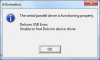
...but the JP.x interface cannot be activated:
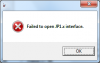
I tried 3 driver versions: 2.08.28, 2.10.00 and 2.12.16. Whenever I check the interface or try downloading from the remote the green LED on the interface flashes 4 times and then the error message is shown. Also, the the TV LED on the remote flashes twice every now and then (I think the remote gets reset or something, but didn't notice any particular pattern).
I considered the marked pin as pin 1:
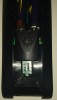
but tried both ways.
I must say that in the rotated mode, the red LED of the interface flashes a 2-3 times too.
The loopback test worked, but JP1xTEST doesn't say anything (just executes itself endlessly).
So... any suggestions?

Thanks!
Posted: Wed May 25, 2016 2:08 pm
by mdavej
IR.exe? Wish you had mentioned that earlier. That's never going to work. Forget about IR.exe. Install Remote Master as you mentioned in your first post and try again.
Posted: Wed May 25, 2016 3:36 pm
by loft
Just tried RMIR... "No remotes found!".
Posted: Wed May 25, 2016 3:53 pm
by The Robman
But they have free shipping, lol
It's a bargain priced $54 on ebay:
http://www.ebay.com/itm/401066147802
Posted: Wed May 25, 2016 4:06 pm
by mdavej
loft wrote:Just tried RMIR... "No remotes found!".
Interface type to Auto and doing a Raw download?
If the pins are right, it should do something. My guess, like yours, is that the marked pin is 1, so:
1 2
3 4
5 6
Posted: Wed May 25, 2016 4:14 pm
by loft
Yes, Auto. And pins were connected like this
2 - yellow
3 - black
4 - green
6 - white
Also tried to reverse the connector by 180*.
And here are the COM port setting:
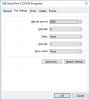
Could this remote be JP1.4 or even JP2?