I've just bought an Xsight Plus and I'm trying to create a Device Upgrade for use with LIRC. I've created a new device with a 1:1 mapping between functions and buttons:
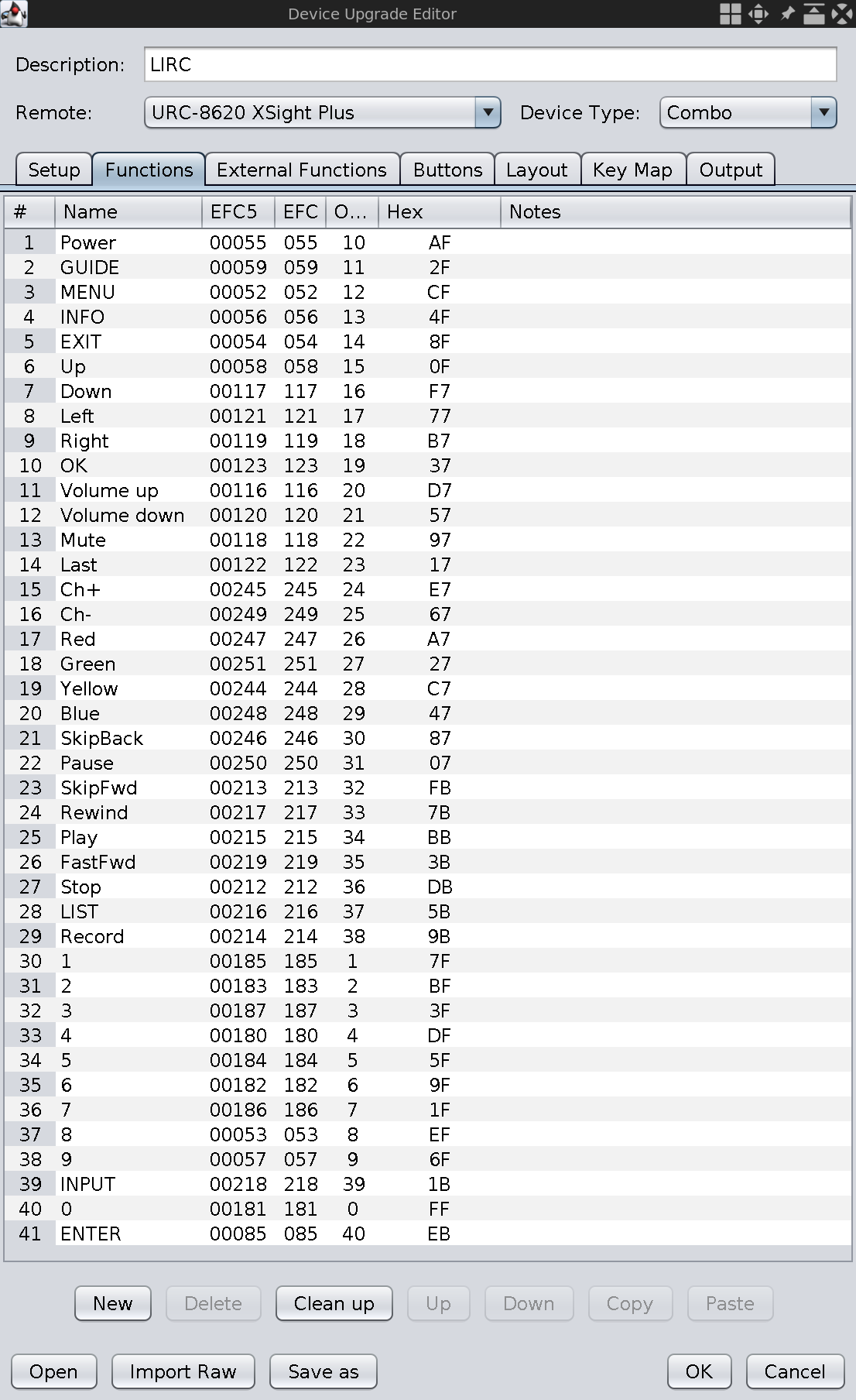
I tried both RC-6 and Panasonic protocols but neither seem to work with LIRC. Here is an excerpt of my first irrecord session using the RC-6 protocol:
Code: Select all
...
Enter name of remote (only ascii, no spaces) :xsight-plus
Using xsight-plus.lircd.conf as output filename

Now start pressing buttons on your remote control.

It is very important that you press many different buttons randomly
and hold them down for approximately one second. Each button should
generate at least one dot but never more than ten dots of output.
Don't stop pressing buttons until two lines of dots (2x80) have
been generated.

Press RETURN now to start recording.
................................................................................
Got gap (106160 us)}

Please keep on pressing buttons like described above.
................................................Cannot find any gap, using an arbitrary 50 ms one. If you have a
regular remote for e. g., a TV or such this is probably a point
where you hit control-C. However, technical hardware like air
condition gear often works without any gap. If you think it's
reasonable that your remote lacks gap you can proceed.
Press RETURN to continue.


Please enter the name for the next button (press <ENTER> to finish recording)
GUIDE

Now hold down button "GUIDE".
Something went wrong: Cannot decode data
Please try again. (28 retries left)

Now hold down button "GUIDE".
Something went wrong: Cannot decode data
Please try again. (27 retries left)

Now hold down button "GUIDE".
Something went wrong: Cannot decode data
Please try again. (26 retries left)

Now hold down button "GUIDE".
Something went wrong: Cannot decode data
Please try again. (25 retries left)

Now hold down button "GUIDE".
Something went wrong: Cannot decode data
Please try again. (24 retries left)

Now hold down button "GUIDE".

Please enter the name for the next button (press <ENTER> to finish recording)
MENU

Now hold down button "MENU".

Please enter the name for the next button (press <ENTER> to finish recording)
INFO

Now hold down button "INFO".
Something went wrong: Cannot decode data
Please try again. (28 retries left)

Now hold down button "INFO".
Something went wrong: Cannot decode data
Please try again. (27 retries left)

Now hold down button "INFO".
Something went wrong: Cannot decode data
Please try again. (26 retries left)

Now hold down button "INFO".
Something went wrong: Cannot decode data
Please try again. (25 retries left)

Now hold down button "INFO".
Something went wrong: Cannot decode data
Please try again. (24 retries left)

Now hold down button "INFO".
Something went wrong: Cannot decode data
Please try again. (23 retries left)

Now hold down button "INFO".
Something went wrong: Cannot decode data
Please try again. (22 retries left)

Now hold down button "INFO".
Something went wrong: Cannot decode data
Please try again. (21 retries left)

Now hold down button "INFO".
Something went wrong: Cannot decode data
Please try again. (20 retries left)

Now hold down button "INFO".
Something went wrong: Cannot decode data
Please try again. (19 retries left)

Now hold down button "INFO".
Something went wrong: Cannot decode data
Please try again. (18 retries left)

Now hold down button "INFO".
Something went wrong: Cannot decode data
Please try again. (17 retries left)

Now hold down button "INFO".
Something went wrong: Cannot decode data
Please try again. (16 retries left)

Now hold down button "INFO".
Something went wrong: Cannot decode data
Please try again. (15 retries left)

Now hold down button "INFO".
Something went wrong: Cannot decode data
Please try again. (14 retries left)

Now hold down button "INFO".
Something went wrong: Cannot decode data
Please try again. (13 retries left)

Now hold down button "INFO".
Something went wrong: Cannot decode data
Please try again. (12 retries left)

Now hold down button "INFO".
Something went wrong: Cannot decode data
Please try again. (11 retries left)

Now hold down button "INFO".
Something went wrong: Cannot decode data
Please try again. (10 retries left)

Now hold down button "INFO".
Something went wrong: Cannot decode data
Please try again. (9 retries left)

Now hold down button "INFO".
Something went wrong: Cannot decode data
Please try again. (8 retries left)

Now hold down button "INFO".
Something went wrong: Cannot decode data
Please try again. (7 retries left)

Now hold down button "INFO".
^C
Code: Select all
...
Enter name of remote (only ascii, no spaces) :xsight-plus
Using xsight-plus.lircd.conf as output filename

Now start pressing buttons on your remote control.

It is very important that you press many different buttons randomly
and hold them down for approximately one second. Each button should
generate at least one dot but never more than ten dots of output.
Don't stop pressing buttons until two lines of dots (2x80) have
been generated.

Press RETURN now to start recording.
................................................................................
Got gap (3441 us)}

Please keep on pressing buttons like described above.
..Cannot find any gap, using an arbitrary 50 ms one. If you have a
regular remote for e. g., a TV or such this is probably a point
where you hit control-C. However, technical hardware like air
condition gear often works without any gap. If you think it's
reasonable that your remote lacks gap you can proceed.
Press RETURN to continue.


Please enter the name for the next button (press <ENTER> to finish recording)
GUIDE

Now hold down button "GUIDE".

Please enter the name for the next button (press <ENTER> to finish recording)
MENU

Now hold down button "MENU".

Please enter the name for the next button (press <ENTER> to finish recording)
INFO

Now hold down button "INFO".

Please enter the name for the next button (press <ENTER> to finish recording)
EXIT

Now hold down button "EXIT".
Something went wrong: Cannot decode data
Please try again. (28 retries left)

Now hold down button "EXIT".
Something went wrong: Cannot decode data
Please try again. (27 retries left)

Now hold down button "EXIT".
Something went wrong: Cannot decode data
Please try again. (26 retries left)

Now hold down button "EXIT".

Please enter the name for the next button (press <ENTER> to finish recording)
Up

Now hold down button "Up".

Please enter the name for the next button (press <ENTER> to finish recording)
Down

Now hold down button "Down".
Something went wrong: Cannot decode data
Please try again. (28 retries left)

Now hold down button "Down".
Something went wrong: Cannot decode data
Please try again. (27 retries left)

Now hold down button "Down".
Something went wrong: Cannot decode data
Please try again. (26 retries left)

Now hold down button "Down".
Something went wrong: Cannot decode data
Please try again. (25 retries left)

Now hold down button "Down".
Something went wrong: Cannot decode data
Please try again. (24 retries left)

Now hold down button "Down".
Something went wrong: Cannot decode data
Please try again. (23 retries left)

Now hold down button "Down".
Something went wrong: Cannot decode data
Please try again. (22 retries left)

Now hold down button "Down".

Please enter the name for the next button (press <ENTER> to finish recording)
...
Code: Select all
# Please take the time to finish this file as described in
# https://sourceforge.net/p/lirc-remotes/wiki/Checklist/
# and make it available to others by sending it to
# <lirc@bartelmus.de>
#
# This config file was automatically generated
# using lirc-0.10.1(irtoy) on Tue May 26 12:30:35 2020
# Command line used: --disable-namespace
# Kernel version (uname -r): 5.6.0-linux-latest-32
#
# Remote name (as of config file): xsight-plus
# Brand of remote device, the thing you hold in your hand:
# Remote device model nr:
# Remote device info url:
# Does remote device has a bundled capture device e. g., a
#     usb dongle? :
# For bundled USB devices: usb vendor id, product id
#     and device string (use dmesg or lsusb):
# Type of device controlled
#     (TV, VCR, Audio, DVD, Satellite, Cable, HTPC, ...) :
# Device(s) controlled by this remote:

begin remote

  name  xsight-plus
  bits            0
  eps             0
  aeps            0

  one             0     0
  zero            0     0
  gap          50000
  toggle_bit_mask 0x0
  frequency    38000

      begin codes
          GUIDE                    0x0
          MENU                     0x0
          INFO                     0x0
          EXIT                     0x0
          Up                       0x0
          Down                     0x0
          Left                     0x0
          Right                    0x0
          OK                       0x0
          VOLUMEUP                 0x0
          VOLUMEDOWN               0x0
          Mute                     0x0
          Last                     0x0
          CH+                      0x0
          CH-                      0x0
          RED                      0x0
          GREEN                    0x0
          BLUE                     0x0
          YELLOW                   0x0
          SKIPBACK                 0x0
          PAUSE                    0x0
          SKIPFWD                  0x0
          REW                      0x0
          PLAY                     0x0
          FWD                      0x0
          STOP                     0x0
          LIST                     0x0
          RECORD                   0x0
          1                        0x0
          2                        0x0
          3                        0x0
          4                        0x0
          5                        0x0
          6                        0x0
          7                        0x0
          8                        0x0
          9                        0x0
          INPUT                    0x0
          0                        0x0
          ENTER                    0x0
      end codes

end remote
Thanks.
 Actually irrecord segfaulted while trying to learn it but Barf's IrScrutinizer import/export idea worked and now lircd is receiving from the Xsight remote. Thank you muchly