Nevo C2 Newbie - stuck
Moderator: Moderators
Nevo C2 Newbie - stuck
OK, so I got my C2, I've installed RemoteMaster, and Conduit. I fired up RM, and it doesn't look anything like the tutorial, so I'm completely lost regarding what to do at this point. Is there a new tutorial or something I can use to get the ball rolling? I only need to add a couple of devices, nothing earth-shattering.
No updated tutorials unfortunately. This youtube video might help a little:
http://www.youtube.com/watch?v=mB6mAHqeW3I
The biggest difference is the new Activities tab. Basic principles still apply. Find device upgrade in our file section, go to devices tab, New, Open (your upgrade file), arrange buttons as desired on the Layout tab (drag and drop), OK, Save, Download to remote.
If you can't figure it out, just use EZ-RC for now, or do the initial device setup on the remote itself. You have to use EZ-RC for the initial firmware update anyway.
FYI, RM doesn't use the Conduit.
http://www.youtube.com/watch?v=mB6mAHqeW3I
The biggest difference is the new Activities tab. Basic principles still apply. Find device upgrade in our file section, go to devices tab, New, Open (your upgrade file), arrange buttons as desired on the Layout tab (drag and drop), OK, Save, Download to remote.
If you can't figure it out, just use EZ-RC for now, or do the initial device setup on the remote itself. You have to use EZ-RC for the initial firmware update anyway.
FYI, RM doesn't use the Conduit.
EZ-RC I guess is the website? I tell it to connect to my remote, and I just get streaming dots ... for minutes on end. Nothing ever happens.
In RM, I don't have an OK button.
Remote does show the USB symbol and says "USB Connected".
So, although I seem to be making a little progress, I'm still stuck.
http://www.hifi-remote.com/temp/RM_zpsk8pzkgih.jpg
In RM, I don't have an OK button.
Remote does show the USB symbol and says "USB Connected".
So, although I seem to be making a little progress, I'm still stuck.
http://www.hifi-remote.com/temp/RM_zpsk8pzkgih.jpg
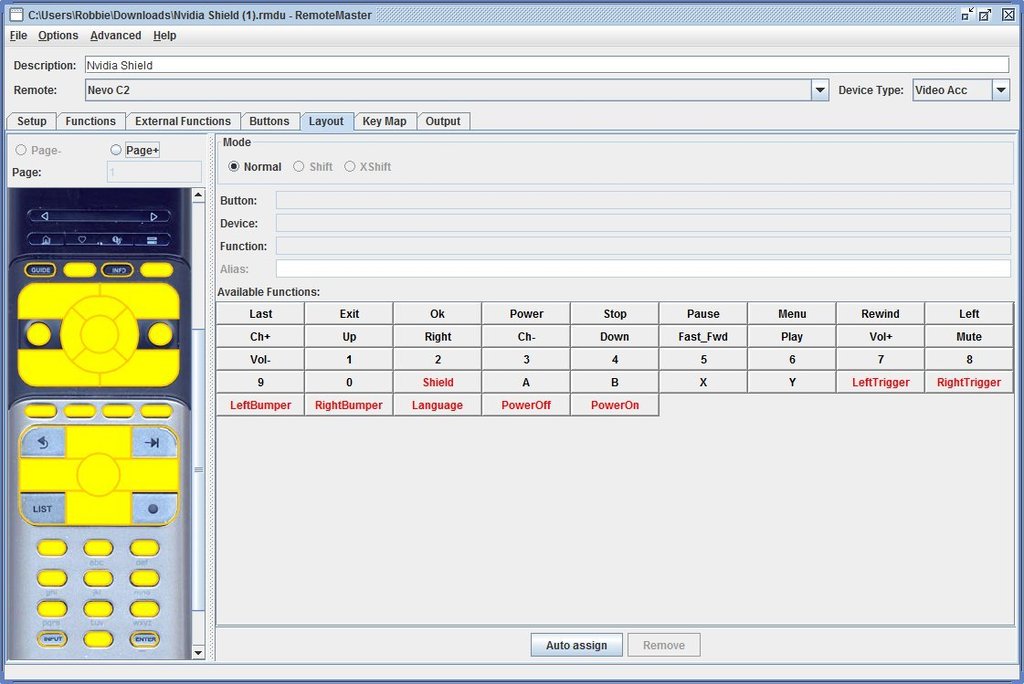
What OS and browser are you running?
OK is on the bottom right of the RM window.
Open one of my old files as an example. Try this one and the steps I listed. You should see OK.
https://www.hifi-remote.com/forums/dload ... e_id=13513
OK is on the bottom right of the RM window.
Open one of my old files as an example. Try this one and the steps I listed. You should see OK.
https://www.hifi-remote.com/forums/dload ... e_id=13513
I am in Windows 10. I have tried Chrome and Edge. If necessary, I could plug this thing into the HTPC which is on W7, but I try to limit what I put on that box unless it's necessary for this to work for me.
OK, that thing you just sent looks completely different than what I see. What is going on here? I'm confused!!!
Still no OK though.
OK, that thing you just sent looks completely different than what I see. What is going on here? I'm confused!!!
Still no OK though.
Sounds like you haven't read the wiki:
http://www.hifi-remote.com/wiki/index.p ... t_and_Nevo
If you don't want to bother with all of that, use W7 for now.
I don't know what image you're talking about. But if you double-click my file, Devices, New, there is an OK button at the bottom right, I swear. RM is only the device editor. If you open it from the Devices tab in RMIR, it has OK. If you open it stand-alone, it doesn't. You'll ultimately be working from a file like the one I gave you. But we have to get through the firmware update first.
http://www.hifi-remote.com/wiki/index.p ... t_and_Nevo
Then you must read the Win 10 requirements and perform the registry changes at least twice, before the firmware update and again during.EZ-RC only works in IE, not in Edge, Chrome, Firefox or any other browser. In Edge, you can re-open the page in IE mode.
If you don't want to bother with all of that, use W7 for now.
I don't know what image you're talking about. But if you double-click my file, Devices, New, there is an OK button at the bottom right, I swear. RM is only the device editor. If you open it from the Devices tab in RMIR, it has OK. If you open it stand-alone, it doesn't. You'll ultimately be working from a file like the one I gave you. But we have to get through the firmware update first.
Last edited by mdavej on Fri Feb 12, 2016 3:49 pm, edited 1 time in total.
OK, I'll go try W7.
I put a picture link in one of the above messages, strange you aren't seeing it.
I read the Wiki, did the registry change, but since I can't do the firmware update I don't have the registry entry without the .
So, let's stop here and I'll go try all this in W7. At least I still have one around.
I put a picture link in one of the above messages, strange you aren't seeing it.
I read the Wiki, did the registry change, but since I can't do the firmware update I don't have the registry entry without the .
So, let's stop here and I'll go try all this in W7. At least I still have one around.
I'm behind a firewall at the moment and all pictures are blocked. That's probably it.
If you use Win 7 and IE, it should work without issue.
Unfortunately, I'm going to be away the rest of tonight and tomorrow morning. Hopefully someone else can pick up and get you over the hump. I'll check back in tomorrow afternoon.
If you use Win 7 and IE, it should work without issue.
Unfortunately, I'm going to be away the rest of tonight and tomorrow morning. Hopefully someone else can pick up and get you over the hump. I'll check back in tomorrow afternoon.
-
The Robman
- Site Owner
- Posts: 21926
- Joined: Fri Aug 01, 2003 9:37 am
- Location: Chicago, IL
- Contact:
I have the same problem at work too. I have moved the pic to my server, so it should be visible now.mdavej wrote:I'm behind a firewall at the moment and all pictures are blocked. That's probably it.
Rob
www.hifi-remote.com
Please don't PM me with remote questions, post them in the forums so all the experts can help!
www.hifi-remote.com
Please don't PM me with remote questions, post them in the forums so all the experts can help!
I'm not quite sure what you mean by "end an activity". In the Nevo the default sort of setup done by EZ_RC creates an activity named "Goodnight". I would call it "All Off". So when you are done with one activity you are doing another activity or turning everything off, which is treated as another activity in the Nevo.I am very close to being done. I think the one thing I'm missing here is I cannot figure out how to end an activity. On the Harmony, you just hit the Power button and that's it. On the C2, it's not ending the activity.
I'm nowhere near my remote to check the version, but here's how to tell if you have the latest or not:
https://www.hifi-remote.com/forums/viewt ... 168#p123168
https://www.hifi-remote.com/forums/viewt ... 168#p123168